
Client review · Services
“The leads speak for themselves”
A service business owner on what changed after SERP Squad took over.
5★client rating
Top 3map rankings
0lock-in contracts
 For AgenciesWe run SEO fulfillment under your brand, clients stay yours, hassle stays ours.Explore White Label SEO →
Rankings on WordPress are won in the details: the right SEO plugin configured properly, a caching stack that gets Core Web Vitals green, images served in WebP, and navigation that both visitors and crawlers understand. We do exactly that, every week, on client sites.
The WordPress reality
We audit WordPress sites every week. The same three problems appear almost every time:
Two SEO plugins fighting, three sliders, a page builder plus a theme builder. Every one adds scripts Google measures. We consolidate to a lean stack that does more with fewer plugins.
Rank Math or Yoast sitting on defaults: no schema profiles, no sitemap pruning, wrong indexation rules. Installation is five minutes; configuration is the ranking work.
Menus with 40 links, orphan pages, categories used as tags. We rebuild navigation and internal linking so authority flows to the pages that earn money.
No mystery tools. This is the stack we configure on client sites and why:
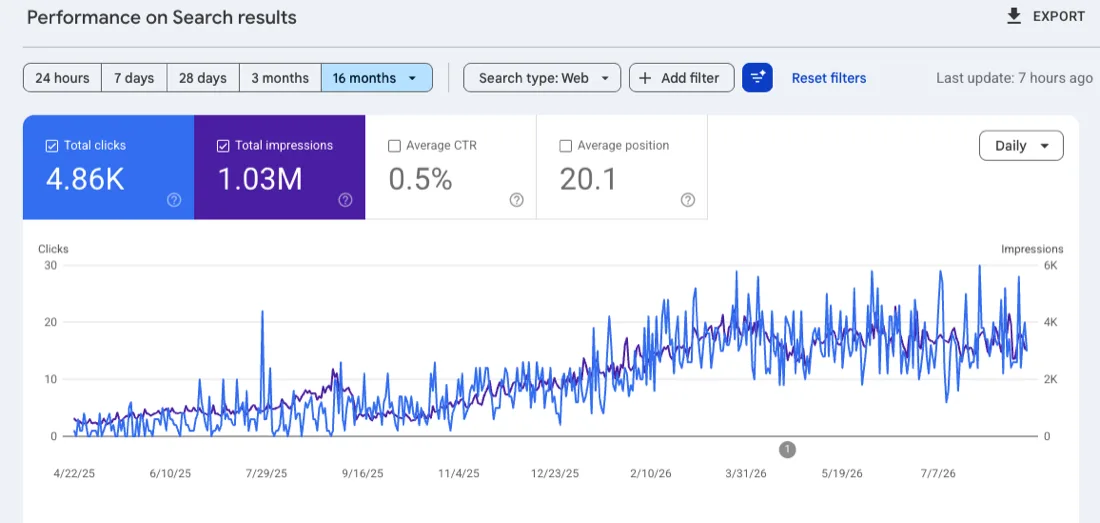
A WordPress client's 16-month Search Console: 4.86K clicks and 1.03M impressions on a curve that keeps bending upward.
Proof, not promises
Sites like yours, taken from slow and invisible to fast and found. More proof on our reviews page and YouTube channel.
A service business owner on what changed after SERP Squad took over.
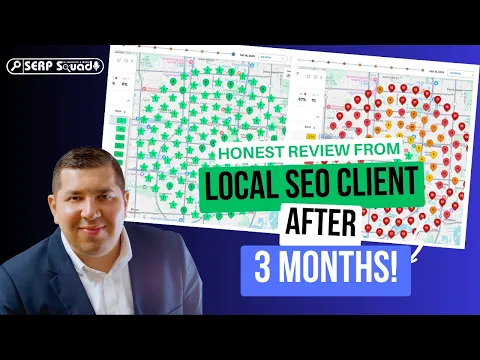
A medical clinic's local visibility transformed after our SEO work took over.
★★★★★“The leads speak for themselves. Best marketing decision we've made.”
Industries we serve
Most of these industries run on WordPress. See the playbook for yours.
The first 90 days
WordPress work front-loads the technical wins, then compounds with content:
Plugin consolidation, Rank Math configured properly, caching and image pipeline installed, Core Web Vitals measured before and after.
Navigation rebuilt, internal linking mapped, first optimized service pages live on the faster foundation.
Speed gains settle into field data, early keywords move, and the content calendar takes over.
New pages publish on schedule, rankings stack, and quarterly stack reviews keep the site fast through every update.
Transparent reporting
You see the same three things we watch: speed, rankings and the work itself.
LCP, CLS and INP from real-device field data, tracked monthly, so speed gains are proven where Google measures them.
Every tracked keyword's position and movement, with the page that carries it, from local terms to blog queries.
Exactly what changed in the stack this month, settings tuned, pages shipped and updates applied, so your site never becomes a mystery to you.
What works now
A well-built WordPress site is the engine behind every one of these channels. Configured right, one stack feeds all six.

WordPress with a lean stack and Rank Math configured properly is still the strongest organic platform there is: fast pages earning compounding positions.

Bing indexes WordPress sites beautifully when sitemaps and structure are right, and it feeds Copilot. IndexNow support makes those rankings nearly free.

For local WordPress sites, Apple Business Connect ties your listing to a fast site that converts, putting you on the default iPhone map credibly.


Schema via Rank Math, clean HTML and citable content make ChatGPT and Perplexity quote your WordPress pages instead of a competitor's.


Your WordPress site anchors every social profile pointing at it. Fast landing pages turn that social traffic into enquiries instead of bounces.

Video embedded right in WordPress, with facades so speed holds, ranks on YouTube while enriching the pages your rankings depend on.
Every one of these channels is part of our WordPress SEO service; your free audit shows which your stack feeds first.
Honest comparisons
WordPress owners get pitched three directions. The honest weighing:
Many agencies quote a rebuild because it bills better, not because your site needs it. Most WordPress sites reach fast, rankable shape through stack surgery at a fraction of a rebuild.
Ads rent the top spot while your WordPress foundation is being fixed; rankings then take over the demand ads were buying. The stack work makes every ad click convert better meanwhile.
GEO, being cited when people ask questions your posts answer, is not a rival discipline. Generative engines lean on the same authority, structure and entity signals strong SEO builds. Rank Math schema and clean WordPress HTML are precisely what AI cites.
Service areas
Strategy tuned to how people search in each market. See every market on our service locations page.
Related services

When the theme is beyond saving, we rebuild it right.
Explore WordPress Website Design →
Running a WordPress store? The store version of this service.
See WooCommerce SEO in detail →The platform-neutral deep-dive on crawling, indexing and speed.
Explore Technical SEO →Pay after the leads arrive
For businesses with a known job value, pay for SEO rankings is often the cleaner arrangement: an agreed amount per qualified enquiry, evidenced, and invoiced after you have reviewed the count.
Buyer beware
WordPress's openness attracts the worst agency behavior in SEO, because whoever holds the admin holds the site. Non-negotiables:
Some agencies register your domain, own your hosting and keep your logins, then the site vanishes if you stop paying. Your domain, website and Google Business Profile must be owned by you, always.
The most common scam is the simplest: a retainer collected every month with no work log and no report. If an agency cannot show you exactly what was done in the last 30 days, the honest answer is usually nothing.
Forty plugins, auto-posted AI blogs and a page builder groaning under both. Activity that actively hurts: every unnecessary plugin is speed lost, and unedited AI volume drags authority down.
Nobody controls Google's results, and Google itself says ranking guarantees are the mark of a scam. Real agencies show evidence and timelines; fake ones sell certainty they cannot deliver.
A 12-month contract exists so an agency gets paid whether it performs or not. If the results were real, the contract would not need to trap you, which is why we do not use one.
Thousand-link packages from link farms and PBNs look like progress until Google catches the network, and it is your site that takes the manual action. Recovering costs more than the links ever did.
Demand admin access to your own WordPress site, your own hosting account, and a change log for the last 30 days. We hand all three over by default, your site should never be a mystery to you, or hostage to anyone.
Rank Math Pro on most builds: one plugin covers meta control, schema, sitemaps, redirects and local SEO modules, replacing three or four separate plugins. Where a site already runs Yoast well, we keep it and configure it properly rather than force a migration.
WP Rocket or FlyingPress for page caching and critical CSS, ShortPixel or Converter for WebP images, and a lean font strategy. On LiteSpeed hosting we use LiteSpeed Cache instead. The goal is green Core Web Vitals with the fewest moving parts.
Not by itself. Elementor plus a heavy theme plus 30 plugins is the problem. We keep Elementor where it earns its weight, pair it with a light theme like Hello or Kadence, and remove what duplicates it.
As few as do the job. Most business sites we take over run 25 to 40 plugins and leave with 12 to 18. Every plugin is a speed cost and a security surface, so each one has to justify itself.
Yes. Page builders add weight, but most builder sites can hit good vitals with the right caching, image pipeline and selective refactoring. We tell you honestly if a rebuild would pay for itself, and we handle multisite and WPML setups too.
No. Every stack change runs on a staging copy first, with backups before anything touches production. You get the change log in your monthly report, so the stack never becomes a mystery.
Fresh from the desk
What we publish between campaigns. Worth a read if you want to understand how this work actually gets done before you pay anyone to do it.
Your audit names the exact plugins costing you speed, the Rank Math or Yoast settings that need fixing, and the three changes that will move rankings fastest.