

A Merchant Center misrepresentation suspension takes every product you have off Google, and the appeal usually comes back rejected without a word about what's wrong. Google isn't going to tell you. The way back is to audit the whole store yourself, in a set order, fix everything a cautious reviewer could object to, and only then ask for one review.
This is written for shop owners and boutiques running their own online store, whether it's on Shopify, WooCommerce or anything else. Below is why Google stays silent, the audit order I use, how to appeal once it's done, and the moves that make a suspension harder to lift.
Why Google won't explain a Merchant Center misrepresentation suspension
In a Merchant Center Help Community thread from a store stuck in auto-rejected appeals, the owner said the automated system kept rejecting every appeal without explaining what was wrong. Diamond Product Expert Emmanuel Flossie's answer was blunt:
"support will almost never tell you specifically what to fix… the burden is entirely on you to audit everything proactively."
He added that it has worked this way since 2020, when Google changed its policy on helping merchants because of bad actors, which makes it harder for honest stores, and that a proper compliance review can take several hours of professional work. The same pattern runs through another merchant's misrepresentation appeal thread in the Merchant Center community: vague suspension, generic rejection, no pointer to the problem.
So stop waiting for a hint. The reviewer is asking one question: would a shopper who has never heard of you have everything they need to trust this store, and is everything the store says true? Your audit has to answer yes to both.
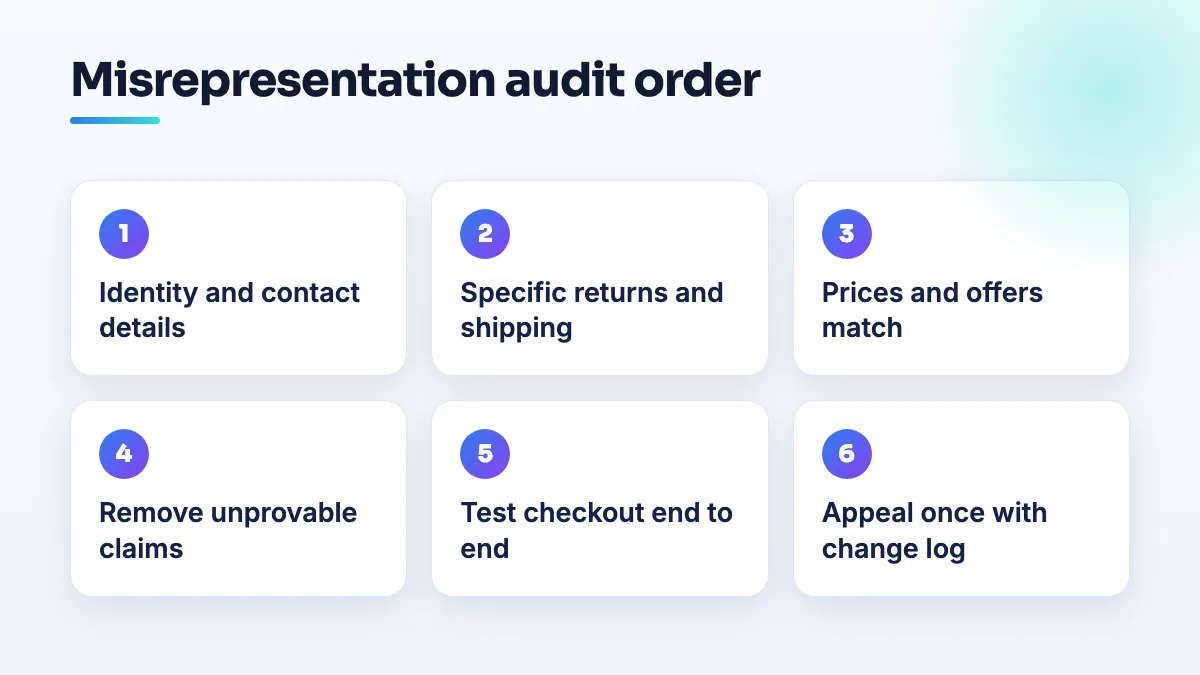
The audit order I use, step by step
I go from the things that identify the business to the things that happen at checkout, because a problem early in that chain makes everything after it look suspicious. Open your store in a private browser window on a phone and on a laptop, and work through it as a stranger would.
- Check who you are and how to reach you. Your business name should be the same on the site, in the Merchant Center business information and on receipts. Put a real phone number, an email address and a physical address where shoppers can find them, usually the footer and a contact page. If you have a shop, use the same address as your Google Business Profile. An about page that says who runs the store and where it is costs you an hour and answers the first thing a reviewer looks for.
- Rewrite your return and refund policy so it's specific. State the return window in days, the condition items must be in, who pays return shipping, how refunds are issued and how long they take. If some items are final sale, say which ones. Link the policy from the footer and from the product or checkout pages.
- Do the same for shipping. Costs, where you ship to and realistic delivery times. Then open Merchant Center and make sure the shipping and returns settings there say exactly what the policy pages say. A policy page that promises free returns while the account settings say otherwise is the kind of contradiction a reviewer notices.
- Check every price and offer. Pick ten products and compare the price in your feed, on the product page and in the cart. They should match to the cent, in the right currency. Remove strikethrough "was" prices you never actually charged, countdown timers that reset, and "sale ends today" banners that have run for months. Taxes and fees shouldn't appear for the first time at the last step of checkout.
- Remove claims you can't back up. "Guaranteed results", health or medical claims, "only 2 left" when there are fifty, "official retailer" for brands you don't have an agreement with, and awards or press logos you can't point to. If you sell branded goods, be ready to show where they come from.
- Take down trust signals you didn't earn. Security badges from services you don't use, review widgets that aren't connected to real reviews, and "as seen on" strips. They're meant to reassure shoppers, and to a reviewer they look like the opposite.
- Test the checkout end to end. The whole site on HTTPS, a working cart, payment methods shown before the last step, no broken links, no pages left over from the theme demo, no placeholder text, no products with missing images or prices. Place a real test order if you can.
- Match the account to the store. In Merchant Center, confirm the website is verified and claimed, the business name and address match the site, and the phone number works. Then make a dated list of every change you made in steps 1 to 7.
How to appeal once the audit is done
Request a review once, after the changes are live, not while you're still working through them. My advice is to treat each review request as expensive. Every rejection you collect without changing anything tells you nothing new, and I wouldn't send them back to back hoping a different reviewer sees it differently.
If the review is rejected again after a full audit, post in the Merchant Center Help Community with your store URL and a short list of what you changed. That's where Product Experts like the one quoted above look at real stores, and a fresh pair of eyes often spots the thing you've been staring past. Keep your change log with the date of each fix, because you'll be asked what's different since last time.
If you'd rather not do this yourself, pay for a compliance review by someone who will show you what they found and why. Be wary of anyone who guarantees reinstatement. Nobody outside Google can.
What's different for boutiques and clothing stores
Fashion stores trip over a few things general retailers rarely do. Final-sale and non-returnable items need to be named on the product page and in the policy, not just in small print at checkout. Size charts should be real measurements, because "fits true to size" doesn't tell a shopper whether they can return it if it doesn't. If you sell designer or branded pieces, second-hand or vintage, say so plainly in the title and description; "authentic" on a listing you can't document is the kind of claim I'd remove. Pre-orders and made-to-order items need their real lead time on the page, not the default shipping time.
General retail shops with a physical store have a different risk: the online store and the shop drift apart. Different business names, a website address that doesn't match the shop, or a phone number that goes to a personal mobile. Line those up with your Business Profile before you appeal.
What not to do after a misrepresentation suspension
- Don't open a new Merchant Center account to get products back up. I'd never do it. To Google it looks like getting around the suspension, and it can end with both accounts down.
- Don't move the store to a new domain and start again. The problems move with it, and so does the history.
- Don't fix one thing and appeal. The reviewer doesn't tell you which item mattered, so a partial fix is a guess, and a rejected guess costs you time.
- Don't copy another store's policy pages word for word. Write what you actually do. A policy that doesn't match how you really handle returns is misrepresentation in itself.
Next step
A suspended account takes your free listings down with it, so once you're reinstated, get Google free local listings running for your shop as well as your online products. The audit work above overlaps heavily with what makes product pages rank, which is why it sits inside our Shopify SEO and ecommerce SEO work, and it's a standard part of SEO for retail stores and clothing store SEO projects.
Written by Saifur Rifat, Founder & SEO Lead at SERP Squad.