


Key points
- Google writes the hotel summary itself
- Amenities, photos and booking links are yours
- Check you're the profile's primary owner
- Correct wrong facts with suggested edits
- Match your website and OTA descriptions
If you've tried to edit your hotel's description on Google and found no box to type in, you haven't missed a setting. On hotel profiles, the About summary guests see is written by Google, not by you, and the owner's description field most businesses get doesn't work the same way for lodging. You can't rewrite it directly, but you can change what Google writes it from, and I'd spend the time there rather than hunting for a hidden setting.
Why hotel owners can't edit the hotel description on Google
This comes up regularly among hotel managers. In a Reddit thread from hoteliers who can't edit the about text, owners describe looking for a way to change the "about the hotel" text on their own listing and not finding one.
The reason, as I understand it, is that Google treats hotels as a travel product as well as a local business. The hotel section of search pulls together prices from booking partners, amenities, reviews and a summary Google writes from what it knows about the property. That summary is built from sources Google chooses, including your own profile details and what it reads about you elsewhere, rather than from a paragraph you submit.
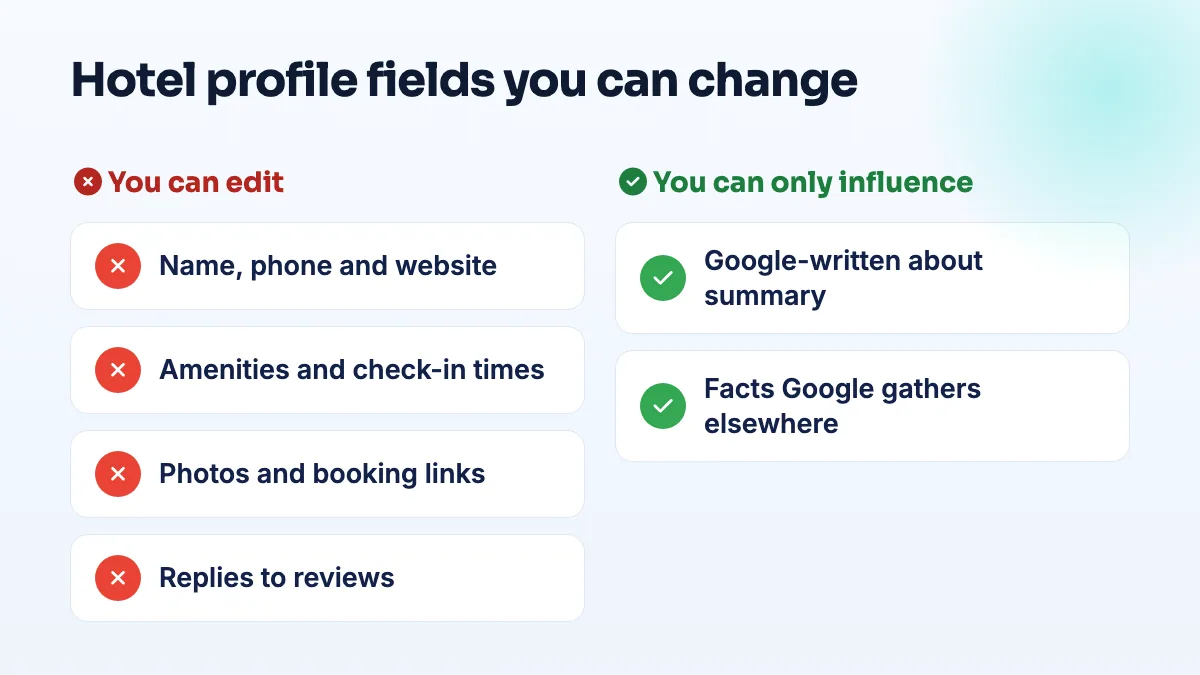
The hotel business profile fields you can control
You have more control than it looks. These are the fields I'd check and fill on every hotel profile:
- Name, address, phone and website, with the website pointing to your own site, not an OTA page.
- Category, set to the right lodging type: hotel, motel, inn, bed and breakfast and so on.
- Amenities and attributes: pool, parking, breakfast, Wi-Fi, pets, accessibility, and the rest. These are the facts guests filter on. When I audit a hotel profile, this is the section I most often find half done.
- Check-in and check-out times.
- Photos, your own and plenty of them, so OTA photos aren't the first thing guests see.
- Booking links and rates, through your booking engine. Setting up hotel free booking links puts your direct rate beside the OTAs.
- Replies to reviews, which are the one place your own words sit right on the listing.
How to influence the parts you can't edit
- Make sure you're the primary owner of the profile. Some hotel settings are hidden from managers. In a Help Community thread from a hotel owner who couldn't reach rate editing, the owner could see the profile but not the hotel settings they needed, so check your role before assuming a field doesn't exist.
- Fill in every amenity you actually offer. Go through the full list, not just the first screen. If the summary is missing something important, like free parking or breakfast, the amenity is usually missing too.
- Fix wrong facts through suggested edits and feedback. If the summary or a detail is plain wrong, like a pool you don't have, suggest an edit on the listing or use the feedback option on the hotel panel, and describe the correction in one sentence. Keep a screenshot with the date.
- Say the same thing everywhere Google reads. Rewrite the about page on your website so the first paragraph states what kind of property you are, where you are and what makes you different. Then make your OTA descriptions say the same. I start with the website because it's the source you fully own and can change today. If every source agrees, the summary has less room to drift.
- Escalate with evidence if a fact stays wrong. Post in the Business Profile Help Community with the listing, the wrong text and proof of the correct information, such as a page on your site.
Exceptions and edge cases
If your profile does show a description field, which I'd check on smaller B&Bs and inns, use it: say plainly what the property is, where it is and who it suits. Don't switch to a non-lodging category just to get the box. You'd lose the hotel features, including prices.
Hotels run by a management company often find the profile is owned by the company's account, which is why settings are missing. Get primary ownership moved to the hotel, and add the company as a manager.
Vacation rentals listed only through Airbnb or VRBO may not have a Business Profile at all, in which case the platforms control the description entirely.
If your profile is a mess of OTA photos, wrong amenities and a summary that doesn't sound like you, that's the kind of cleanup we do in hotel SEO and Google Business Profile optimization. And if guests are booking you through OTAs even when they searched your name, it's worth working out what Booking.com commission costs you each year.
People also ask
Why is my hotel's Google rating different from Booking.com?
The two scores use different scales and different reviewers. Google rates out of five and accepts reviews from anyone who interacted with your hotel, while Booking.com scores out of ten and collects reviews from guests who booked and stayed through it. A 3.7 on Google and a 5.9 on Booking.com can mean the same experience. Work on the Google score, because it sits beside your direct booking link.
Read the full answer: Why is my hotel's Google rating different from Booking.com? →
Can an agency's restricted Google account get my profile suspended?
Yes. If an agency, freelancer or vendor with access to your listing has its Google account restricted, Google can suspend every profile connected to that account, and yours goes with it. The notice says a Google account associated with the profile was restricted. Proving your address won't fix it: remove the account, have the agency resolve its restriction, and appeal on that point.
Read the full answer: Can an agency's restricted Google account get my profile suspended? →
Can you appeal a Google review decision more than once?
No. You get one appeal on each review Google decides not to remove, and once the appeal is denied, that decision is final for that review. Wait for the first decision before appealing, and only appeal with new evidence tied to a specific policy clause. After that, your options are a calm public reply, reporting new reviews from the same accounts, and outnumbering the review with genuine ones.
Read the full answer: Can you appeal a Google review decision more than once? →
How do you ask a B2B buyer for a Google review?
Ask one named person who saw the job go well, such as the engineer whose first article passed or the manager who watched your sign go up, within a day or two of the job. Ask in person first, then send a short email with your direct review link. Tell them they don't need to mention part numbers or their company, and never offer anything in return.
Read the full answer: How do you ask a B2B buyer for a Google review? →
Can a booth renter get their own Google Business Profile?
Usually not at the salon's address. Google only lets a business in a shared space list that address if it has its own dedicated space with permanent signage, where customers deal with its own staff during business hours. An open-floor chair doesn't pass that test. A private suite with your name on the door can, and a renter who also travels to clients can list as a service-area business with the home address hidden.
Read the full answer: Can a booth renter get their own Google Business Profile? →