

Clients tap "Book" on your Google profile and land on Booksy, Vagaro or a travel site you don't use, or on the provider you left months ago. To remove a booking link from your Google Business Profile, first work out where it comes from, because there are only a few sources and each one is removed in a different place. A link someone added by hand comes off in the profile. A link sent by a booking platform has to be stopped by that platform.
Barbershops, nail salons, spas and hotels all run into this, and it's one of the most frustrating problems in the Help Community because it looks like it should take one click. Below is how I trace the link, the order I'd remove it in, and what to do when it keeps coming back.
Where third-party booking links on Google come from
The same complaint appears thread after thread. A Houston barbershop owner in a Help Community thread about Booksy links Google wouldn't remove spent two weeks being told the fix would take 24 to 48 hours. An operator with around 170 locations wrote in a thread about two years of fighting unauthorized booking links that "Clients book services through platforms we don't use, leading to confusion and lost business", after more than 100 contacts with support.
In my experience these links come from one of four places:
- A booking platform's integration with Google. Booking platforms that partner with Google send business listings and booking links to it. If you, a former manager or a renter ever had an account that matched your business, a link can appear whether or not you chose it.
- An old provider you've left. The owner in a Help Community thread about an old Vagaro link after switching to Mindbody moved providers and the Vagaro link stayed.
- A link someone added by hand. You, a staff member, a former agency or a booking provider's setup team may have typed a booking or appointment link into the profile.
- Travel sites, for hotels. Hotel profiles show booking options from online travel agencies through a separate hotel system, which I cover below.
How to remove a booking link from your Google Business Profile
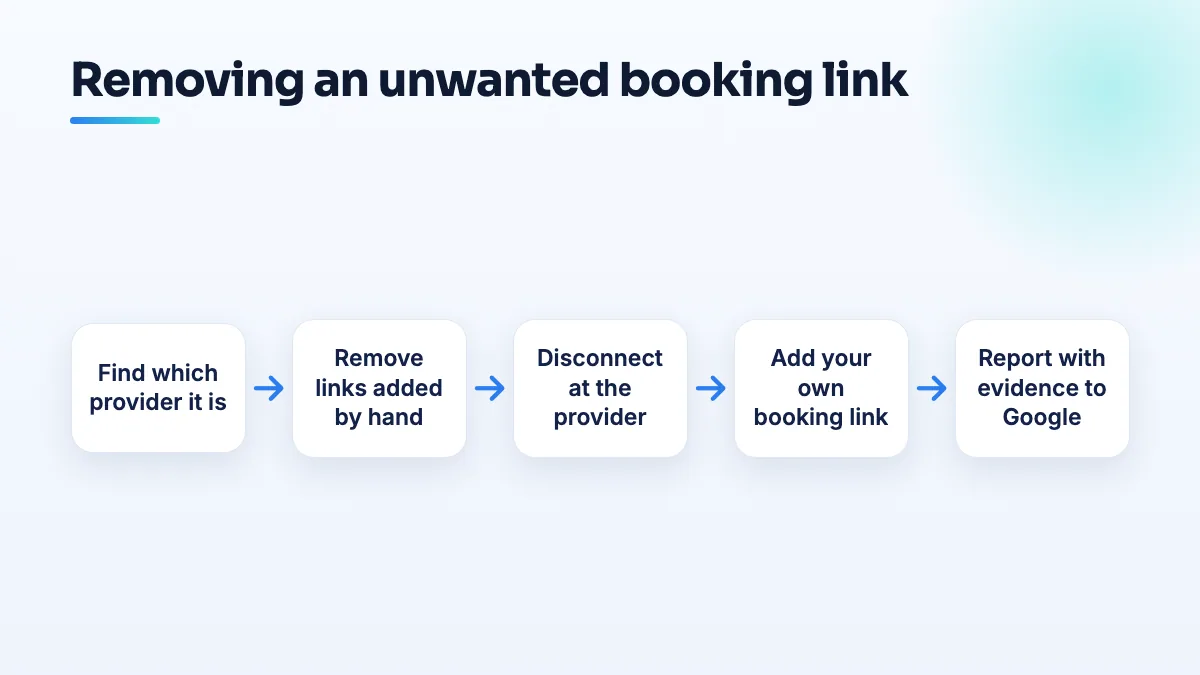
- Identify the provider and screenshot it. Search your business name on a phone, tap the booking button and note the domain it opens. Screenshot the button and the page it lands on, with the date. You'll need this evidence at every later step.
- Check the profile's booking settings. Open your profile, go to the bookings or appointment link section and look at what's listed. If the unwanted link is one that was added by hand, edit or delete it there. That's the easy case.
- Check who has access to the profile. Look at the owners and managers list. Remove former staff, old agencies and anyone who no longer works with you. People with access can add links back.
- If it comes from a provider you used, disconnect it at the provider. Log into the old Booksy, Vagaro or other account and turn off its Google or "Reserve with Google" connection, if the setting exists. If you've closed the account, email their support and ask in writing for your business to be removed from the listings they send to Google. Include your business name, address and Google Maps link.
- If it comes from a provider you never used, ask them to delete the listing. Contact the provider's support with the same details and your screenshots, say plainly that you are the owner, you don't use their service and you want your business removed from their Google feed. Keep the reply.
- Add your own booking link. Put the link to the system you actually use in the profile, so there's a correct option even while the wrong one is still being removed.
- Report it to Google Business Profile support. Once the provider has confirmed removal, or has ignored you, contact support with your screenshots, the provider's reply and a clear sentence: "This booking link is from a provider we do not use and must be removed." Note the case ID.
- Check again after a week, on phone and desktop. Changes don't always show everywhere at once. If the link is still there, move on to the escalation steps below.
If the booking link keeps coming back
The 170-location operator's story shows how long this can drag out when it's handled one ticket at a time. If you're past a week or two with no change:
- Keep one log. A spreadsheet with every contact: date, who you spoke to (Google or the provider), case ID and what they promised. Support promises of "24 to 48 hours" mean nothing without a record.
- Post in the Help Community with the full facts. Business type, the provider, that you don't use it, what the provider said, your case IDs and screenshots. Product Experts can't remove links themselves, but they can escalate a case that's clearly stuck.
- Get the provider's confirmation in writing. If the provider says they've removed you and the link is still there, that written reply is the strongest thing you can give Google.
- For multiple locations, handle them as one case. List every affected location in one spreadsheet instead of opening separate tickets for each.
Barbershops, nail salons and spas: renters and switching providers
Salons have two causes the other industries don't.
Renters. A chair or room renter can create a booking account that matches the shop's name or address. In a Help Community thread from a barbershop that lost 124 reviews, a booth-renting barber linked his Booksy profile to the shop's address, and the shop's listing ended up split in two. If you own the shop, make it a condition of the rental that renters don't connect booking platforms to your address. I cover the wider trade-off, including the Booksy fees barbers pay, in a separate answer.
Switching providers. The Vagaro-to-Mindbody case shows what can happen to any spa or massage studio that changes software. When you switch, disconnect the old provider from Google before you cancel the account, then add the new link. Canceling first can leave the old link sitting on your profile with nobody on the other end to turn it off. It's one of the first things I check in day spa SEO work after a software change, and in barbershop SEO where renters come and go.
Hotels and B&Bs: third-party booking links on Google
For accommodation the problem is different. Hotel profiles show prices and booking options from travel sites through Google's hotel system, and a hotel owner in a Help Community thread about third parties adding hotel booking links found links appearing without permission. You generally can't remove a genuine online travel agency that legitimately sells your rooms. What you can do:
- Get your own direct rate listed next to theirs. Google's free booking links let a hotel show its own website as a booking option. I walk through the setup in the post on hotel free booking links.
- Report links from sites you have no agreement with. If a site is taking bookings for your property without a contract, collect screenshots and report it to Google support, the same way as above.
- Check your channel manager. A link that won't update is often coming from a connection you set up years ago and forgot about.
Travel sites' photos can also sit on your profile and link out to them. That's a separate fix, covered in the guide to handling OTA photos on a hotel Google profile. For the bigger picture of winning direct bookings, it's part of our hotel SEO work.
What not to do
- Don't delete your profile and start again. You'll lose your reviews, and the provider's link can reattach to the new one.
- Don't mark the business closed to stop bookings. It stops real customers too.
- Don't keep paying an old provider just to control the link. Disconnect it, get the removal in writing, and cancel.
- Don't open a new support ticket every day. One case, one log, and an escalation through the Help Community works better than twenty tickets.
Where to start
Tap your own booking button today and note where it goes. If it's wrong, work down the steps above in order. If you'd rather hand it over, untangling booking links and profile access is part of our Google Business Profile management.
Written by Saifur Rifat, Founder & SEO Lead at SERP Squad.