

When a guest searches your hotel's name, Google shows a list of places to book, and on a lot of independent hotels every one of them is an OTA. Google free booking links fix that by putting your own rate, from your own booking engine, in that same list at no cost per click. Most small properties can switch them on through the booking engine or channel manager they already use.
Below is why it matters, the setup order I use, and what to do when the link you control won't update, when you can't reach rate editing, or when your brand search sends guests somewhere else entirely.
Why your own hotel name needs your direct rate
Someone who types your hotel's name has already chosen you. If the only prices they see belong to OTAs, you pay commission on a guest you won for free; I explain how fast that adds up in what Booking.com commission costs a small property.
It can be worse than an OTA. In a Reddit thread from hoteliers whose brand searches landed on mirror sites, owners describe guests searching the hotel's name and ending up on masked third-party sites made to look like the hotel's own. A guest who books there, then turns up at your desk with a booking you've never seen, blames you.
Free booking links don't remove every OTA from your brand search. They put you in the list with your own price, which is what most guests want to see before they book.
How to set up Google free booking links, step by step
Google changes the menus often, so I'll describe what has to be true at each step rather than which button to press.
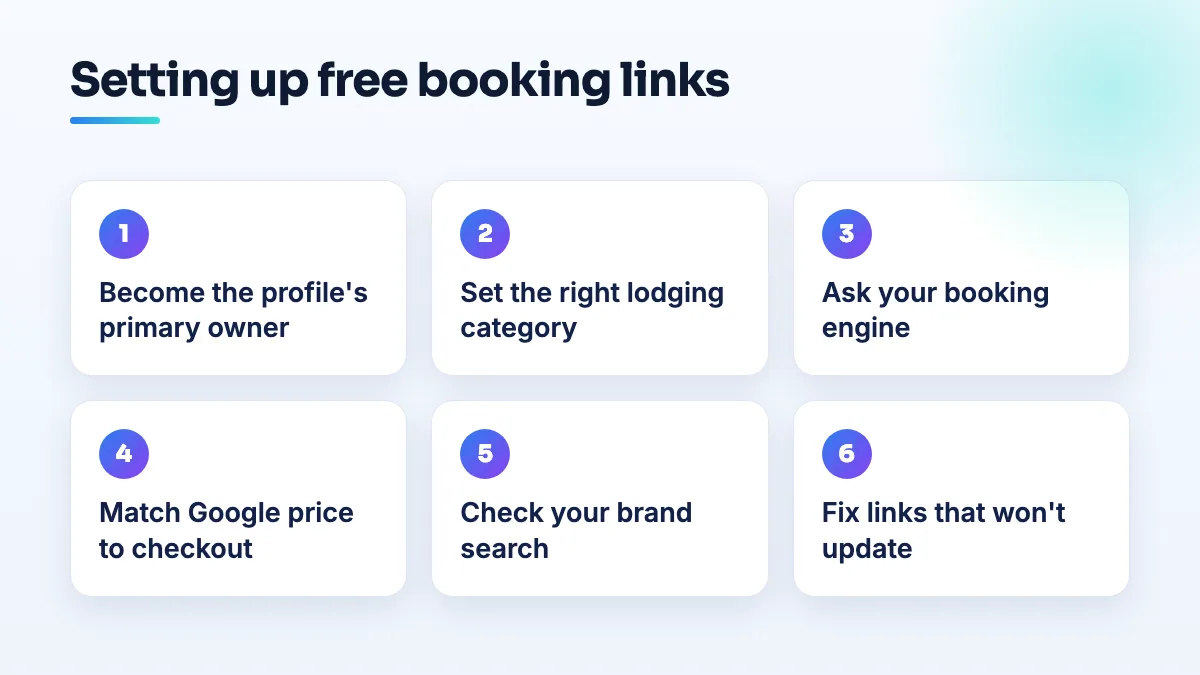
- Make sure you are the primary owner of the hotel's profile. Open your Business Profile and check the list of people with access. If the primary owner is a former manager, a management company or a web designer, get ownership transferred to an account the hotel controls before you do anything else. Rate and booking settings follow ownership.
- Confirm the profile is set up as a hotel. Your primary category should be the right lodging type (hotel, motel, inn, bed and breakfast and so on). Lodging profiles get hotel features, including prices; a profile set up under a general category won't.
- Ask your booking engine or channel manager to send your rates to Google. Most booking engines and channel managers used by small hotels can connect to Google's hotel program. Send them your profile's name, address and the email that owns it, and ask two things: do they support free booking links, and can they switch it on and match it to your profile. If your provider can't, that's a strong reason to look at one that can.
- Make the price on Google match the price at checkout. The rate Google shows should be the rate a guest pays on your booking page, with the same taxes and fees. If they don't match, guests bounce, and Google can stop showing your price.
- Check your brand search after a few days. Search your hotel's name on a phone and a laptop, signed out, for several dates. Open the prices list and confirm your own link is there, goes to your booking engine and shows the same rate.
- Keep your rates flowing. Close-outs, seasonal prices and minimum stays all need to reach Google. If your channel manager stops syncing, your link can quietly show stale prices or disappear.
If you don't have a booking engine yet
Plenty of small inns and B&Bs still take bookings by phone and email, with the OTAs as the only way to book online. Free booking links need a live, bookable rate to point at, so there's nothing for Google to show until you have one. My advice is to add a simple booking engine to your own website first, check it books cleanly on a phone, and only then ask the provider to connect it to Google. Put the phone number on the profile too, because some guests at small properties still want to talk to you before they book.
When your hotel booking link isn't updating
This is the most common complaint I see after setup. In a Help Community thread from a hotel whose booking link won't update, the owner controlled the link and changes still didn't show. Almost always, there's more than one source for the link and the one you're editing isn't the one Google is showing.
- The link in the profile versus the link from your rate feed. A booking link typed into the profile and a booking link sent by your booking engine are different things. Changing one doesn't change the other. Ask your provider which URL they send.
- An old provider still sending data. If you changed booking engines, the old one may still be connected. Ask them in writing to disconnect your property.
- A third party adding its own link. In a Help Community thread about third parties adding booking links without permission, a business found links it never authorized. If that's your case, follow the steps to remove a third-party booking link from Google.
If you've checked all three, screenshot the profile's booking settings, the link Google shows and your provider's confirmation, and post them in the Business Profile Help Community. Product Experts there can often tell you which source Google is using.
When you can't reach rate editing on your own profile
In a Help Community thread from a hotel owner who couldn't access rate editing, the owner could see the profile but not the rate settings. When I see this, it's usually one of two things: the account is a manager rather than the primary owner, or the rates are controlled by a connected provider, so Google doesn't offer them for manual editing. Fix ownership first. Then ask your booking engine whether it's already sending rates for you, because if it is, that's where you change them.
Reclaim the rest of your hotel brand search
A working booking link is one part of your brand search. The rest of the profile needs to be yours as well:
- Replace OTA photos with your own. In a Help Community thread about OTA photos on a hotel's profile, photos on the hotel's own profile linked out to the OTA. Upload a full set of your own photos, and report the ones that aren't yours.
- Make sure the website field is your own site, not an OTA listing page or a mirror site.
- Correct the hotel details you can edit. Some fields on hotel profiles, like the about text, aren't directly editable; I cover which hotel business profile fields you control and how to influence the rest.
- Report mirror sites that pretend to be you. If a site copies your name and photos to take bookings, report it to Google as impersonation, keep screenshots, and tell the guests who contact you exactly which site is yours.
What not to do
- Don't give your booking engine or a marketing agency primary ownership of your profile. Add them as managers. I'd never hand over ownership to set up a booking link.
- Don't paste a different URL into the profile every week hoping it sticks. Find the source first.
- Don't advertise a rate on Google that isn't bookable on your site on those dates.
- Don't pay for ads on your own name until the free booking link is live and correct.
Next step
Free booking links are usually the quickest direct-booking win a small property has, and they're one of the first things we set up in hotel SEO projects. If ownership, duplicate listings or OTA content on your profile are getting in the way, that's Google Business Profile management.
Written by Saifur Rifat, Founder & SEO Lead at SERP Squad.