

Google asked for a verification video, you filmed your van or your home office, and the rejection came back asking for a storefront, signage and a cash register you have never owned. The way through is to stop trying to film a shop: Google Business Profile video verification without a storefront passes on three things, the area around your hidden address, your vehicle or equipment, and proof that you run the business, filmed only after the profile is set up correctly as a service-area business.
This hits every business that works at the customer's door: plumbers, roofers, cleaners, dog walkers, driving instructors, photographers, flooring installers, handymen. I went through the Google Business Profile Help Community threads where these videos fail, and the rejections read almost word for word the same. So do the mistakes behind them.
Below is what I check on the profile before anyone presses record, the shot list I use, what changes by trade, and what to do when a video still comes back rejected.
Why Google asks a service-area business for a storefront
The rejection text is written for shops. A dog walker shared hers in a Help Community thread about a rejected verification video: "Feedback is must show a store front, cash register or employee or business signage. I have none of these." In a Help Community thread from a roofer whose video was rejected, the owner wrote the sentence I see more than any other from the trades: "I am a roofer. I do not have a storefront; I travel to meet my customers." A mobile drain business was told to show a signboard and a till. A solo house cleaner was asked to film a location he doesn't have.
That feedback is not the standard you're actually held to. In a thread from a driving school stuck in automated verification, a Google Product Expert set out what a service-area business video has to show: the area around the hidden address, business equipment or a vehicle, and proof of management. No sign. No till. No shop.
A Product Expert community guide on business addresses points the same way. It explains that service-area businesses aren't expected to have signage, that a virtual office or remote mailbox isn't eligible, and that proof of management usually means something like opening a locked door you control. So when a rejection says "storefront", I read it as "we couldn't confirm that a real business is run from this place, by you."
Fix the profile before you press record
A good video won't save a profile that looks ineligible. When I look at a home-based profile that keeps failing, the video is rarely the only problem. These are the settings I check first, and they're the same triggers owners describe over and over in suspension threads:
- Home address hidden. If customers don't come to your home, the address must not show publicly. You still enter it so Google knows where you're based; you just switch it off from public view. I explain the setting and its ranking side effects in the guide to hide your home address on Google Business Profile.
- A service area you actually drive. List the towns or ZIP codes you really work in. A state-wide area on a one-van business looks like a lead generator. Product Experts have told mobile businesses to keep the area within roughly a two-hour drive of their base.
- The business name as it's registered. No city names, no "24/7", no "best". The name on the profile has to appear somewhere in your video, and nobody's van or license says "Emergency Plumber Near Me".
- A primary category that matches the work. If you mostly clear drains, don't pick a category for a plumbing supply store. The equipment in your video should make sense for the category you chose.
- The same name, phone and website everywhere. Your website, Yelp, Facebook and any directories should match the profile exactly. Mismatches give a reviewer one more reason to doubt you.
If you're already dealing with a suspended Google Business Profile, fix these before you appeal or film anything. A video filmed on top of a broken setup just uses up an attempt.
What Google Business Profile video verification without a storefront has to show
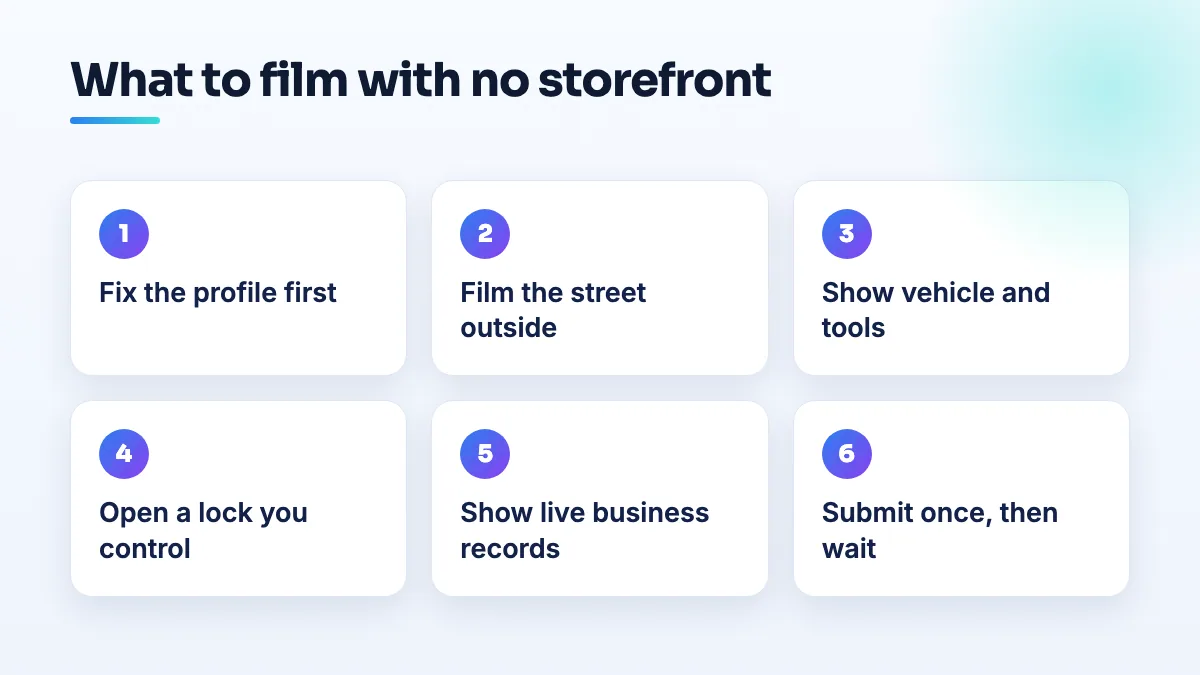
This is the shot list I give home-based clients. Film it as one continuous clip on your phone, in daylight, holding the phone steady. Walk the route once before you record so you don't stop to think halfway. Nothing below needs a shop.
- Start on the street outside the address you hid. Stand at the end of your driveway or at the building entrance and show the street sign, the neighbors' house numbers or a landmark on the corner, then turn to your own door or driveway. This is the "area around the hidden address" the Product Expert described, and it's the shot people skip. A home-based HVAC company had its video rejected for showing no view of the surrounding area. If your road has no sign, walk to the nearest intersection sign and back without stopping the recording.
- Walk, still recording, to your vehicle or equipment. Show the license plate and any decal or magnet with your business name. Then open the back and show the tools and stock you use every day: the drain machine, the ladders, the floor sander, the cleaning caddies. A branded van helps but isn't the point. Tools that match your category are.
- Prove you're the one in charge. Use your own key to open something only the business controls: the van, the garage, the tool lockup, the home office door. This is proof of management in its plainest form, and it's exactly the kind of shot the community guide describes.
- Show the business running. On your phone or laptop, open your invoicing or booking software on a recent job, then your business insurance certificate or trade license with the business name visible. Keep client names and addresses off the screen.
- Tie the name together. Make sure the exact name on the profile appears at least once on something physical: the van, a printed invoice, a license, a uniform. If the name only exists on Google, the reviewer has nothing to match it to.
- Upload the clip as filmed, then leave the profile alone. No cuts, no music, no edits. Don't change the address, hours or service area while it's under review. Owners in the forum regularly report suspensions that landed right after an edit.
One warning about paperwork. A home-based wedding photographer in a long Help Community thread sent tax registration, invoices, phone bills and screen recordings of their website admin, hosting account and portfolio, and got nothing back but automated replies. Documents prove a business exists. They don't prove it's run from the place you're verifying. The Product Expert's answer in that thread was about the profile, not the paperwork: hide the home address and set realistic service areas.
What to film for your kind of business
The three things Google wants never change. What fills them does. This is where I'd point the camera for the businesses that ask me about this most.
| Business | Vehicle or equipment shot | Proof you run it |
|---|---|---|
| Plumbing and drain cleaning | Van, drain machine, inspection camera, fittings stock | Van key, invoicing app open on a recent job |
| Roofing | Truck with ladder rack, trailer, harnesses, shingle bundles | Truck key, contractor license showing the business name |
| Handyman and flooring | Van or trailer, saws, sanders, labeled tool cases | Garage or lockup key, liability insurance certificate |
| Cleaning | Car with supply caddies, vacuum, mops | Booking schedule screen, business insurance |
| Pet care | Car with crates, leads, pet first-aid kit | Booking app dashboard, business license or insurance |
| Driving school | Dual-control car, instructor badge in the windshield | Car key, badge, lesson diary |
| Photography | Camera bodies, lenses, lighting cases, editing desk | Office door key, client gallery admin |
For a plumber the van really is the whole story, which is why the verification setup comes before anything else in the plumbing SEO work I take on. Photographers should film the editing desk as part of the equipment shot, because a camera bag on its own could belong to a hobbyist.
Credentials help, but they don't finish the job. The driving school in that first thread had its approved instructor badge, vehicle insurance and proof of address ready and was still going round automated support loops. I explain why a licensed contractor cannot verify with Google on credentials alone in a separate answer. It matters most for licensed trades, and it's a question I get in almost every roofing company SEO project.
If the video is rejected again
- Write down exactly which status the profile shows. In the driving school thread, the Product Expert wouldn't give advice until the owner said which of three statuses the profile was stuck at, because the next step is different for each. Screenshot it with the date.
- Match the rejection to the three shots. If it mentions location or surroundings, your street shot was too short. If it mentions signage or equipment, show the vehicle and tools longer and closer. If it mentions management, you need the key shot and the business records.
- Fix the profile, then reshoot once. Don't send the same clip again. A home builder in a Help Community thread about three rejected verification videos had three videos rejected in eight days and then hit "No more ways to verify". Every attempt counts, so make each one better than the last.
- Wait for the decision. Submitting again mid-review doesn't speed anything up. If it's taking far longer than it should, read what to do when verification is stuck before you contact anyone.
- Post in the Help Community with the facts. Give your business type, that you're a service-area business with the address hidden, what your video showed shot by shot, the exact rejection wording and any case ID. Product Experts can't verify you themselves, as one said plainly in the driving school thread, but they can tell you what your status allows and escalate a case that's clearly stuck.
What not to do
- Don't rent a virtual office or mailbox to have something to film. The community guide is clear they aren't eligible, and a coworking desk that isn't staffed by your own people fails the same test.
- Don't film a friend's shop or a client's premises as if it's yours. The place you film has to be the address on the profile, hidden or not.
- Don't unhide your home address to look more established. If customers don't come there, a visible home address is one of the settings most likely to get a home-based profile suspended.
- Don't keep resubmitting. In another thread I read, a handyman's verification was blocked after four attempts.
- Don't pay anyone selling ready-made or "verified" profiles. Owners have reported social media ads offering Google Maps profile creation for a fee. Those are the listings Google's checks exist to catch, and you don't want your business anywhere near them.
Questions people ask
Do I need a branded van?
No. A decal helps because it ties the name to the vehicle, but I wouldn't hold up verification waiting for one. The tools, the key shot and the business records do more work than a logo.
Can I film at a customer's house instead?
No. The video is checking the address on your profile, even though customers can't see it. A job site shows your work, not where the business is run from.
I work from an apartment. Can I still verify?
Yes, with the same three shots: the street and your building entrance, your car or equipment, and your key opening your door or storage unit. An apartment-based cleaner in one thread was still ruled "not eligible" after doing everything asked, which is why I get the profile settings right before the first video, not after the third. It's the first thing I check in any cleaning business SEO project for the same reason.
Getting verified is step one, not the finish line
Most of the verification fixes I do are profile work first and video second. It's the first job in our Google Business Profile management, because none of the ranking work matters on a profile that isn't live. If you'd rather have the setup checked before you spend another attempt, it's included in our local SEO services.
Written by Saifur Rifat, Founder & SEO Lead at SERP Squad.