


Key points
- Verified and published are two different gates
- Always test with a signed-out search
- No result by name means unpublished
- Found by name only means filtered, not hidden
- A website, directories and registry build trust
Your dashboard says verified, but customers can't find you, and when you search the name the profile only shows up for you. A verified Google Business Profile not showing publicly is usually stuck at a second gate: verification proves you're real, and publication is a separate decision about whether Google is confident enough to show the listing to everyone.
The fix depends on which gate you're stuck at, and you can tell that in five minutes.
Why a verified Google Business Profile is not showing
The best explanation I found came from a Product Expert in a Help Community thread about a contractor verified but never published. A Vancouver contractor had passed verification and the profile never went live. The expert's diagnosis: the business had no website, no directory listings and no registry record, so Google couldn't tell it apart from an older business with the same name. Verification cleared. Publication didn't.
Owners in very different trades describe the same thing. A handyman in a Help Community thread about a profile only visible to the owner saw "Only visible to you" on a verified listing. A menswear shop in a thread where a retail shop was approved but never went live was approved and never appeared. So did an outcall massage profile that never appeared on Maps, a grooming salon and a verified real estate agent.
A third group is published but acts invisible. An HVAC company in a Help Community thread about a verified HVAC listing that wasn't indexed had a listing that existed and produced nothing. That's a different problem with a different fix, so work out which one you have first.
How to tell which gate you're stuck at
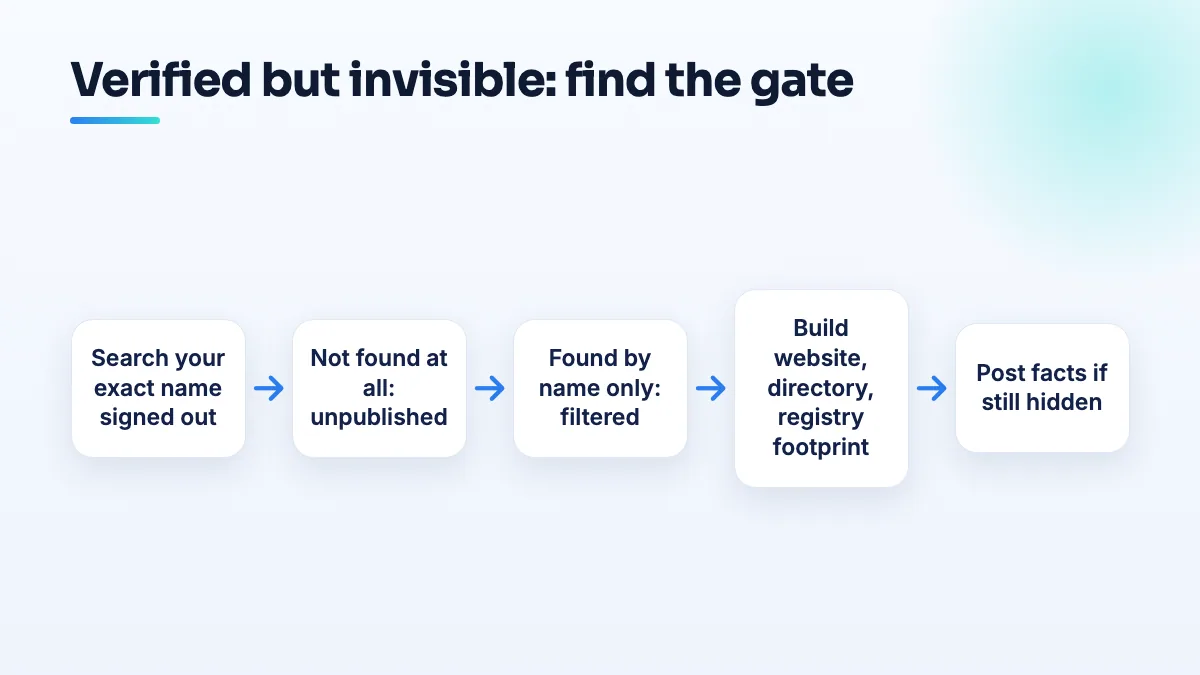
- Search your exact business name while signed out. Use a private browser window on Google Maps and on Google Search. Signed in, you'll see your own profile whatever its status, which is how owners fool themselves.
- If nothing comes up, the profile isn't published. This is the "Only visible to you" state. It's about trust in the entity, not about ranking.
- If it comes up for the name but not for your service and town, it's published and filtered. Search "handyman in [your town]" or "HVAC repair [your town]". Missing there is a ranking problem. As one Product Expert told a handyman in the forum, "There is no support available for ranking issues," so support won't fix it for you.
- Build the footprint Google is looking for. Publish a website page with the exact name, address or service area and phone on the profile. Get the same details onto the main directories and your state or provincial business registry. If another business shares your name, make the difference obvious: your town, your trade, your registration number.
- Give it time, then post the facts. If it's still unpublished a few weeks after the footprint is live, post in the Help Community with the verification date, screenshots of the signed-out search and links to your website and listings. That's the evidence a Product Expert needs to escalate.
What I would not do while you wait
- Don't create a second profile. It's tempting when the first one seems dead, and I'd resist it. It gives Google two entities with the same name to tell apart, which is the exact problem the Product Expert described, and you end up with a duplicate to clean up later.
- Don't keep editing the name or category. Each change can send a verified profile back into review. My rule is to get the footprint right and leave the profile itself alone.
- Don't pay anyone who promises to force the listing live. Nobody outside Google can publish a profile. My advice is to put that money into the website and listings that actually move the decision.
Edge cases
- New businesses with no history. Construction firms and handymen that just started are the most exposed, because they often have nothing online except the profile. Building the footprint before you verify saves weeks, and it's a standard part of our contractor SEO and handyman SEO setups.
- Hidden home addresses. A service-area business with the address hidden still gets published. Hiding the address isn't what blocks publication, though Local Search Forum regulars report hidden-address listings can struggle to rank once live. It's one of the first trade-offs I weigh in HVAC SEO.
- Verification that's still pending. If the dashboard doesn't actually say verified yet, you're not at this gate. Read what to do when verification is stuck instead.
- Profiles that show and then vanish. If it was visible and disappeared, check for a suspension or a duplicate before anything else. The broader checklist for a business not showing on Google Maps covers those.
Matching directory listings are the part most owners skip, and it's exactly what our citation building work does. If you'd rather hand over the whole profile, that's Google Business Profile management.
People also ask
Can you use a coworking space or virtual office for Google Business Profile?
Only with your own dedicated office there. Google allows a coworking address only if the office has clear signage, receives customers during business hours, and is staffed during those hours by your own staff, not the operator's reception. A virtual office, mailbox, hot desk or day pass doesn't qualify, and profiles listed at them are regularly suspended.
Read the full answer: Can you use a coworking space or virtual office for Google Business Profile? →
Why did Google change my business category or name without asking?
Google edits profiles on its own when its systems, or suggestions from the public, decide your details are wrong. It happens most to service-area businesses with hidden addresses: Joy Hawkins confirmed one wave of forced re-categorization hit only those listings. Put your category or name back with a single edit, then make your website, signs and other listings use the same words so the change doesn't return.
Read the full answer: Why did Google change my business category or name without asking? →
Will Google remove a review from someone who was never a customer?
Usually not, if they dealt with your business at all. Google doesn't require reviewers to be customers, only to have interacted with you, so reviews from refused clients, couriers and towed drivers normally stay. Google does remove reviews with no real interaction, reviews about something other than your business, and reviews from someone with a personal conflict of interest. For the rest, a calm reply is your best tool.
Read the full answer: Will Google remove a review from someone who was never a customer? →
Will Google support help if my business stops ranking?
No. Google Business Profile support won't investigate why a live profile dropped in the rankings, and Product Experts say so directly. Support does act on profile problems: suspensions, verification, ownership, rejected edits and reviews or listings that break the rules. Check first whether your profile is live and findable by name; if it is, the drop is yours to diagnose.
Read the full answer: Will Google support help if my business stops ranking? →
Why does only one practitioner at our office show up on Google Maps?
Because Google's local filter usually shows only one of several listings that share an address and a category. It isn't a penalty, and the other listings still exist; they're hidden for that search. Agents, advisors, lawyers and instructors at one office trip it most. Different primary categories, direct phone numbers, genuine suite numbers and each listing's own reviews reduce it.
Read the full answer: Why does only one practitioner at our office show up on Google Maps? →