

You're changing your business name, and the Google profile that brings in half your calls is the thing most likely to break. The safe way to rebrand a Google Business Profile is to change it last: paperwork, signs, website and directories first, then the profile name as a single edit on the same profile, with nothing else changed that week.
I've gone through the Google Business Profile Help Community threads where rebrands went wrong. A licensed pharmacy was suspended for changing the format of its name. A building company lost its category visibility after a restructure. A physio clinic renamed and could no longer reply to its own reviews. None of them did anything dishonest. They changed things in an order that looked suspicious from Google's side.
Why a rebrand puts your Google Business Profile at risk
A name edit on an established profile gets reviewed again. The reviewer, human or automated, compares the new name with what it can see: your website, your signs, your registration, your other listings. If those still show the old name, the profile looks like it's claiming to be something it isn't, and that is what a deceptive content finding means.
The three ways it goes wrong are well documented:
- Suspension. In a Help Community thread from a licensed pharmacy suspended after a name-format edit, the only change was how the name was written. The profile was suspended for deceptive content and the appeal sat under review for two weeks. Appeals can take anywhere from 2 to 30 business days.
- Lost visibility. In a Help Community thread about a restructure that killed category visibility, a business reorganized its company structure and quietly stopped showing for its category in the ZIP codes it served. A property services company described its map rankings dropping after a rebrand in a Help Community thread about a rebrand that lost map rankings.
- Broken features. A physiotherapy clinic that changed its name and moved found it could no longer reply to reviews, and three contacts with support didn't fix it, according to a Help Community thread from a renamed clinic that couldn't reply to reviews.
There's a fourth, rarer risk: the new name itself. A massage business in Australia was suspended twice, first for deceptive content and then for hate speech, and the owner suspects a word in its trading name set off an automated filter (a Help Community thread about a trading name that may have tripped a filter). Before you pay for signs, read the new name the way a blunt machine would.
The rebrand order I use
Everything Google might check should carry the new name before the profile does. This is the order I follow, and I'd allow a few weeks for it rather than doing it all on a Friday afternoon.
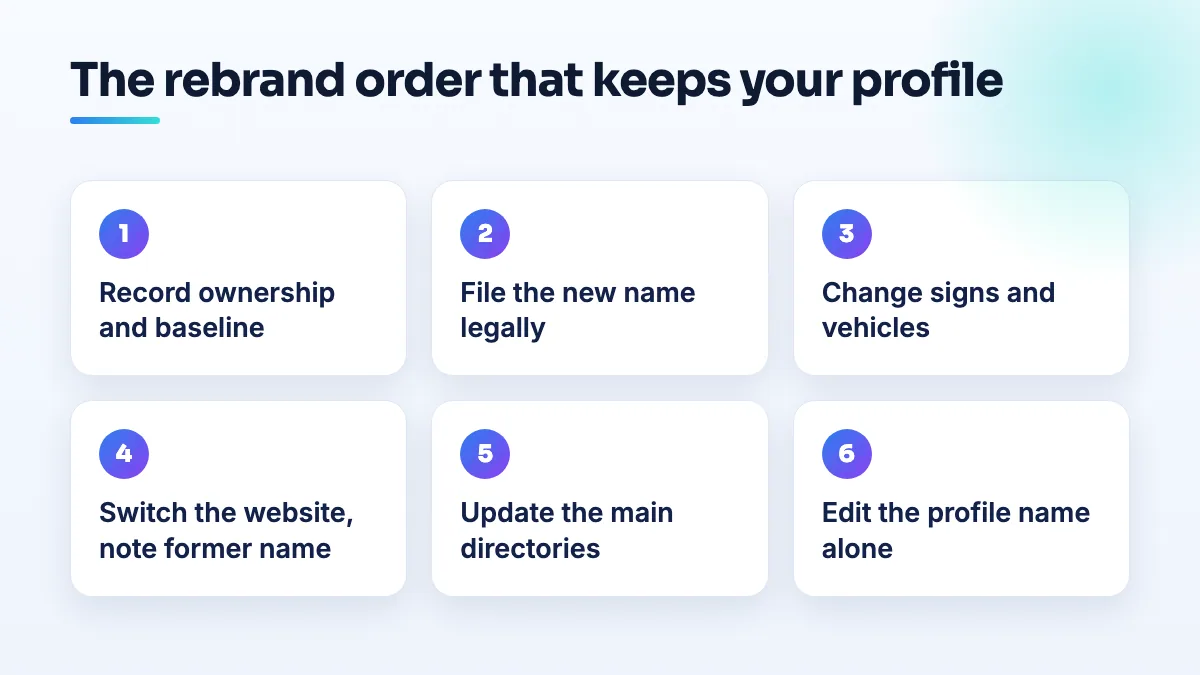
- Confirm who owns the profile and record a baseline. Make sure the primary owner is your own Google account, not an agency or a former employee. Then screenshot your review count, rating, the searches you rank for from a few locations, and the calls and direction requests in your Performance report. If something drops later, you'll know by how much.
- File the new name legally. Register it as a DBA or amend your company registration, and update every license and permit that shows a name. For licensed businesses, the license record is one of the first things a reviewer looks up.
- Change your signs and vehicles. Put the new name on the door, the window and the van. Take dated photos. If Google asks for a verification video after the edit, the name on camera has to be the new one.
- Switch the website. New name in the header, page titles, footer, contact page and structured data. Add a plain line on your About page: "formerly Old Name". Keep the same domain if you can; if you must move, redirect every old page to its new equivalent.
- Update your main directory listings. Your biggest directories, your social profiles and any industry or licensing directory. Mismatched names across the web are what NAP consistency work fixes, and it's worth doing before the profile edit, not after.
- Edit the profile name on its own. Same profile, same address, same phone, same categories, same website link. Only the name changes. If your domain is changing too, update the website link on the profile a week or two later as a separate edit.
- Watch it for a month. Check the profile status, search the new name, reply to a review to confirm replies still work, and compare rankings with your baseline. Add photos of the new signage once the name is accepted.
If you're not rebranding but deciding which of two names belongs on the listing, the short answer is in Google Business Profile legal name or trading name.
Rebrand, restructure or sale: keep the same profile
The instinct when a business changes hands or reorganizes is to start a fresh profile for the new company. I'd almost never do that. The existing profile holds your reviews, your history and whatever standing Google has given it. A new profile starts at zero and can be treated as a duplicate of the old one.
- New holding company or entity, same business. Keep the profile, update the name if the public name changes, and leave the categories exactly as they were. Changing categories during a restructure is the likeliest way to lose visibility you can't explain afterwards.
- You bought the business. Get ownership of the existing profile transferred to your account before you rename anything. In a Help Community thread from a buyer who couldn't take ownership after an acquisition, the new owner of a flooring business had a changed name and a profile they still couldn't take control of.
- Merging two businesses into one brand. Pick the profile that will survive, rebrand that one, and handle the other separately. Don't rename both to the same name and hope Google sorts it out.
What's different for pharmacies
Pharmacies have more places where the name is on record: the state board license, the permit on the wall, prescription labels and insurer contracts. A pharmacy name that's written one way on Google and another on the license is exactly the mismatch the suspended pharmacy ran into, even though its edit was only a change of format.
The evidence list from that thread is a good checklist for any licensed premises: permanent signage, a business card, the lease or license, the reception area, the back of house, payment methods and equipment. Get the new name onto all of them that can show a name, and film or photograph them before the profile edit. If you advertise, the name on your ad certification should also match; Google's healthcare ads policy requires US pharmacies to be certified before they can advertise. I cover the pharmacy side of this in our pharmacy SEO work, and testing labs and collection sites face the same checks.
If the rebrand has already gone wrong
The profile was suspended after the name change
Don't change the name back. Another edit starts another review. Finish the steps above so the signs, website and paperwork all show the new name, then appeal with that evidence. My guide to Google Business Profile appeal evidence covers what to send so the appeal answers the actual finding.
Rankings dropped but the profile is live
First check whether anything besides the name changed: categories, the website link, the service area. Put back anything that shouldn't have moved. Then check that your website no longer mixes the old and new names, and that your biggest directories carry the new one. If everything matches and rankings still haven't recovered after several weeks, look at the baseline you recorded and at which searches dropped.
You can't reply to reviews
I don't have a guaranteed fix for this one, and the physio clinic didn't find one through support either. Check that you're signed in as an owner or manager of the renamed profile, not a leftover listing, then post in the Help Community with the date of the rename and what the reply box shows. A Product Expert can escalate what support won't.
What not to do
- Don't change the name, address, phone and category in one go. Each change is a reason for review; all of them together look like someone took over the listing. I explain why in the answer on editing a Google Business Profile and getting suspended.
- Don't create a new profile for the new brand. You lose the reviews and risk a duplicate suspension on both.
- Don't add keywords to the new name. "New Brand Plumbing and Drain Cleaning Houston" is not a rebrand, it's keyword stuffing, and it's a known suspension trigger.
- Don't erase the old name everywhere overnight. Customers and Google both need the link between the two names. The "formerly" line stays for at least a year.
- Don't let anyone edit the profile before the signs are up. That includes your agency and your web developer.
Plan it before the sign company starts printing
A rebrand is usually booked months ahead, so the Google side can be planned too. If you're a contractor restructuring into a new entity, the section on keeping the same profile matters most; it's the mistake I see most in contractor SEO, and clinics going through a name change hit the review-reply problem often enough that it's a standing check in our physical therapy SEO work. If you'd like us to run the order for you, it's part of our Google Business Profile management.
Written by Saifur Rifat, Founder & SEO Lead at SERP Squad.