


Key points
- Confirm monthly versus annual billing in writing
- Note the renewal date and the notice period
- Check whether the price can rise at renewal
- Judge it on cost per signed job
- Track every enquiry's source for 90 days
Is Houzz Pro worth it? For most remodelers, only if the contract and the lead numbers both hold up when you check them, and the reviews from contractors who signed suggest they often don't. The complaints repeat: a price quoted monthly, an invoice for the whole year, a few weak leads, and a renewal that arrives before you've decided.
Here's what contractors report after signing, what I'd check in the paperwork before you commit, and how to tell whether the leads are paying for themselves.
What remodelers report after signing up for Houzz Pro
Billing comes up first. In contractor reviews of Houzz Pro on Software Advice, remodelers describe being sold a monthly price and then invoiced around $4,000 for the year up front. Some also describe the price going up by about 30% at renewal, with no option to stay on the old rate.
Lead quality is the second theme. Reviewers on both Software Advice and Houzz Pro reviews on Capterra describe low volume, and one summed it up as "maybe 2 leads per month, most low quality." For a remodeler with a large average job, two leads a month can still work. It stops working when neither of them turns into a signed contract.
Then there's renewal. A contractor in a Reddit thread about Houzz Pro auto-renewing described the plan renewing with no visible cost, no end date and no cancel path they could find in the account. That's one person's experience, but it's why I tell every client to find the renewal date on day one, not in month eleven.
None of this means Houzz never works. Some remodelers use the software side every day and treat any leads as a bonus. My point is narrower: judge the leads on their own numbers, because that's usually what you were sold.
Is Houzz Pro worth it for you? Check these before you sign
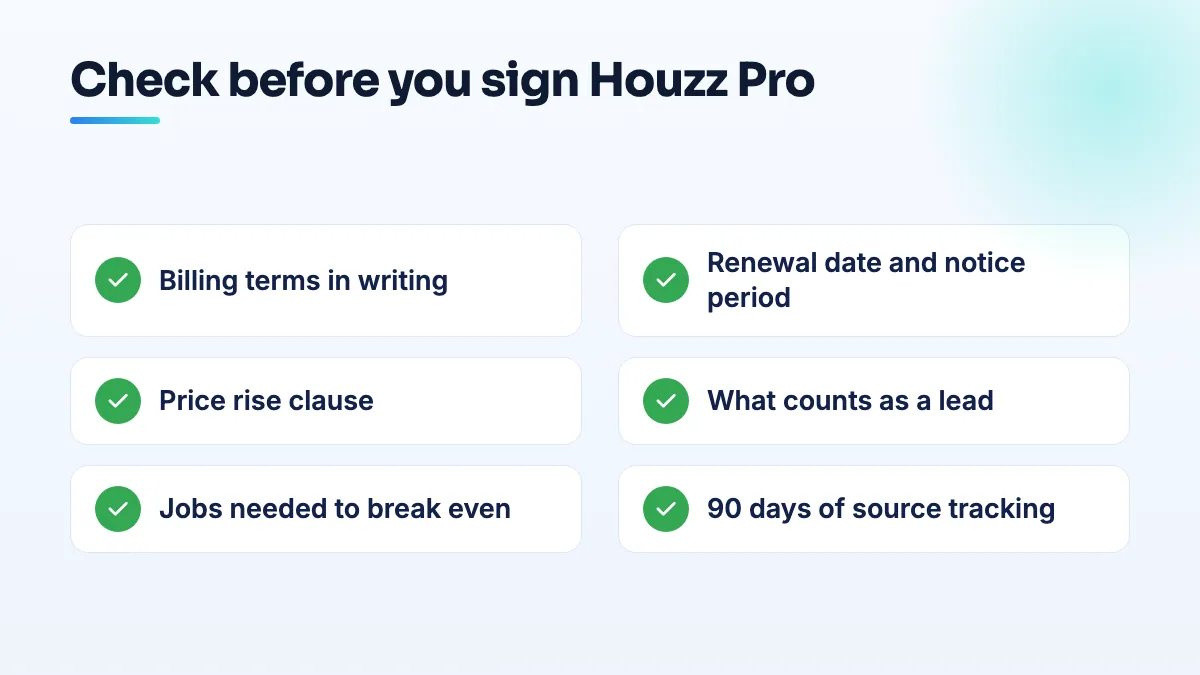
I'd do all six before paying anything. If the rep won't answer one of them in writing, that's your answer.
- Get the billing terms in an email. Ask for the price, whether it's charged monthly or as one annual invoice, and the date of the first charge. If the call said "monthly", ask directly whether that's a monthly price on a yearly commitment paid up front.
- Find the term, the renewal date and the notice period. Write down how long the contract runs, whether it renews automatically, and how many days' notice you must give to stop it. Put a reminder in your calendar well before that notice window opens.
- Read the price-change clause. If the contract lets the price rise at renewal, ask what accounts like yours paid the year before and whether you can leave at that point without a penalty.
- Ask what counts as a lead. Is it a phone call, a message, a quote request, a profile view? Ask whether the same homeowner is sent to other pros too, and whether you can see where each lead came from.
- Work out the jobs you need to break even. Divide the yearly cost by the gross profit on your average job. If the year costs $4,000 and a typical bathroom leaves you more than that after materials and labor, one signed job covers it. If most enquiries are small repairs you don't want, even ten leads may not. I show the full method in my guide to break even cost per lead.
- Track the source of every enquiry for 90 days. Ask every caller how they found you and log it in a spreadsheet: source, job type, quote value, won or lost. At renewal you'll have real numbers instead of a sales rep's.
If you've already signed and want out
- Find your contract and the exact renewal date. Look in your email for the order confirmation and the terms you accepted.
- Send a written non-renewal notice before the notice window closes. Email it, keep a copy, and ask for a written confirmation. A phone call leaves you with nothing to point to later.
- Check your card statement after the renewal date. If you're charged after giving proper notice, you have the email trail to take to Houzz and, if needed, to your card issuer.
- Keep your own records of every lead until the end. If you need to argue about what you received, your log is the only evidence you control.
How it compares with other lead platforms
Remodelers usually weigh Houzz Pro against Angi, HomeAdvisor and Thumbtack. Those sell leads differently, often to several contractors at once, and I break down the shared leads contractors end up paying for in a separate post. The test is the same for all of them: cost per signed job, not cost per lead.
My honest view: a lead platform is rented visibility. When you stop paying, it stops. Four thousand dollars a year spent on your own Google Business Profile, project pages with real photos and a steady flow of reviews keeps working after the invoice is paid. That's the core of our remodeling SEO work, the same approach runs through our contractor SEO projects, and it's all part of our local SEO services.
People also ask
Are service area pages still safe after the August 2026 spam update?
Service area pages that give each town real, specific information are still safe. Pages that only swap the city name into the same text match Google's description of doorway pages and were at risk long before August 2026. Reports of pages dropping after the update are anecdotal and inconsistent, so audit each page: keep the ones with local substance, merge the thin ones into one service-area page, and cut pages for towns you don't serve.
Read the full answer: Are service area pages still safe after the August 2026 spam update? →
Does your service area affect where you rank on Google Maps?
Not in the way most owners expect. Adding towns to your service area doesn't make you rank in the map pack there. Map rankings are anchored to the address you verified with, even when it's hidden, and the service area mainly tells customers where you work. To reach nearby towns, use real town pages, reviews from customers there, ads, or a genuinely staffed second location.
Read the full answer: Does your service area affect where you rank on Google Maps? →
Why does my verified Google Business Profile not show up publicly?
Because verification and publication are separate. Verification proves the business is real; Google still has to be confident enough to show the listing to everyone. A new business with no website, directory listings or registry record can pass verification and stay "Only visible to you", especially if an older business shares its name. Search your name signed out to see which gate you're at, then build that footprint.
Read the full answer: Why does my verified Google Business Profile not show up publicly? →
Does a commercial contractor need search visibility if work comes from bid boards?
Yes, but not for the reason most agencies sell. On a hard low-bid public job, price decides. Before that, someone has to invite you, prequalify you or put you on a bidders list, and they check your name online first. A site with real project pages, clear credentials and a correct Google profile is what gets you onto the lists where the bid is decided.
Does a contractor license help you pass Google Business Profile verification?
Not much on its own. Google doesn't verify you because you're licensed; it checks that your records, profile and video all point to the same business at the same address. A license lookup or corporate filing showing a different address, or a mailbox, can make verification fail. Align every record first, then show the license in your video as supporting proof.