


Key points
- Start from the category that wins your main search
- Pick the most specific category that's still true
- Avoid categories that require a visitable location
- Custom services and your website carry the specialism
- Change the category once, then leave it
When there's no Google business category for your business, pick the closest category that describes what customers hire you for, based on what the businesses already ranking for your main service use. Then say exactly what you do everywhere Google lets you use your own words: secondary categories, the services list, the description and your website.
The category is one signal, not the only one. I'd rather have an imperfect category with precise services and pages around it than a perfect category with nothing behind it.
Why there's no Google business category for your business
Google's category list is fixed, and it's built around common business types. Specialists fall through the gaps. An erosion control company in a Help Community thread about a missing erosion control category wrote that Google wanted them to use General Contractor or Landscaper. An individual driving instructor in a thread about a missing driving instructor category couldn't find one either.
Categories also disappear. Members of the Local Search Forum noted in a thread about listing a home-based RV repair business that Google had removed mobile RV repair as a category. And some categories come with conditions. A manufacturer in a thread about a category that requires a visitable location couldn't verify because the category it picked expects customers to come to the premises.
How to choose when no category fits
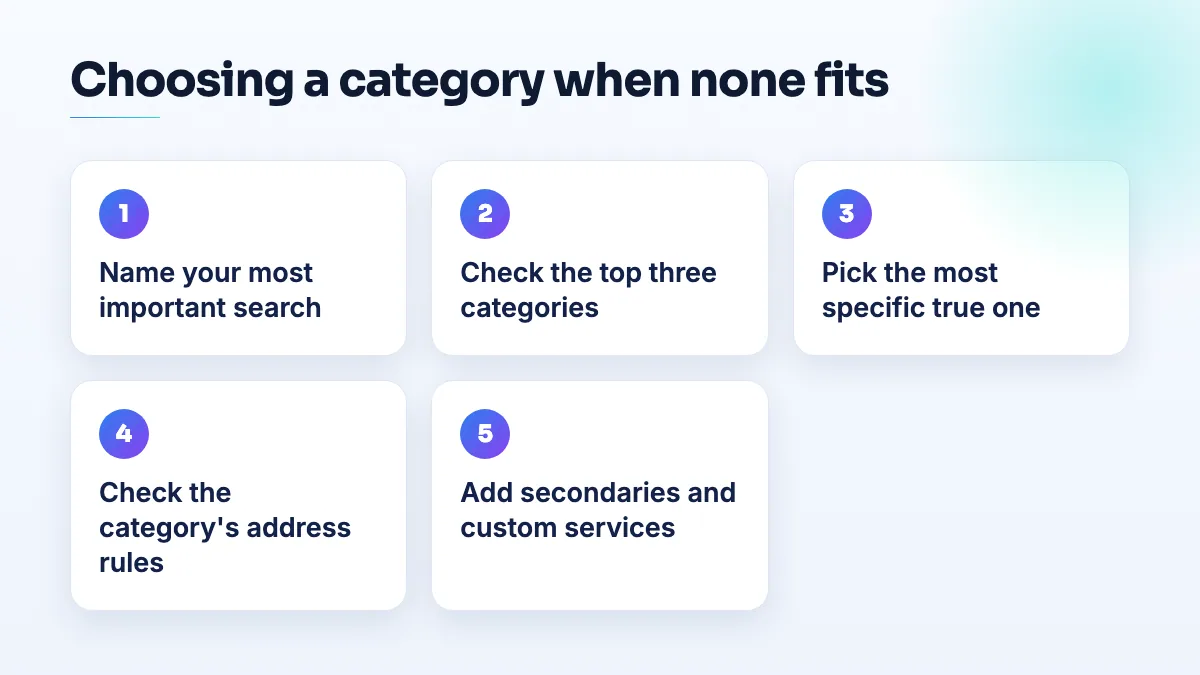
- Write down the one search that matters most. Not everything you do. The service most of your revenue comes from, in the words customers use: "erosion control", "CNC machining", "driving lessons".
- See what the winners chose. Search that phrase in your area and look at the category under each name in the top three map results. The Local Search Forum advice to an EV repair garage that had around eight plausible categories was exactly this: pick the primary category that wins for the search you care about.
- Pick the most specific category that's still true. If the choice is General Contractor or Landscaper, choose the one that describes the work a customer would see you doing. A narrow category that fits beats a broad one that half fits.
- Check the category's rules before you save. If you're a service-area business, avoid categories that expect customers to visit. Some categories, Mechanic among them, force a visible address. If the category needs a storefront you don't have, it will cost you verification.
- Add secondary categories for the other real work. Only services you actually sell. Each one should be something you'd be happy to be found for tomorrow.
- Describe the exact service in your own words. Add custom services with your real names ("erosion control blankets", "silt fence installation"). Open the description with a plain sentence saying what you do. Build a page on your website titled with the exact service.
- Make the change once. A contractor in the Help Community reported that editing categories knocked a live profile back into verification, and my answer on editing Google Business Profile and getting suspended covers that risk. Decide, change, then leave it.
For the full logic of primary and secondary choices, my answer on choosing Google Business Profile categories goes further.
Edge cases by type of business
Construction specialists. Erosion control, fencing, grading and similar trades often end up under General Contractor. That's fine if the services list and your website carry the specialism. It's a fix I make often in contractor SEO.
Manufacturers. Contract manufacturers and fabrication shops have the extra problem that customers rarely visit. If the closest category assumes walk-in customers, you may not qualify for a profile at the industrial unit at all, and organic pages for each capability will do more. I cover that trade-off in manufacturing SEO work.
Driving instructors. Most individual instructors are best served by the driving school category, because that's what learners search. The service area and services list then say you teach one-to-one and pick up from home. It's the starting point I use for driving instructor SEO.
Mobile auto and RV repair. When a mobile category is removed, the nearest remaining one may force a visible address. Check before you choose. And watch the profile afterwards: Joy Hawkins confirmed on the Local Search Forum that Google was re-categorizing some mobile auto glass listings, and only ones with hidden addresses. If Google changed your business category without asking, that answer covers what to do.
If you want the category, services and pages set up together, it's part of our Google Business Profile management.
People also ask
Does a contractor license help you pass Google Business Profile verification?
Not much on its own. Google doesn't verify you because you're licensed; it checks that your records, profile and video all point to the same business at the same address. A license lookup or corporate filing showing a different address, or a mailbox, can make verification fail. Align every record first, then show the license in your video as supporting proof.
How do you ask a B2B buyer for a Google review?
Ask one named person who saw the job go well, such as the engineer whose first article passed or the manager who watched your sign go up, within a day or two of the job. Ask in person first, then send a short email with your direct review link. Tell them they don't need to mention part numbers or their company, and never offer anything in return.
Read the full answer: How do you ask a B2B buyer for a Google review? →
Which Google Business Profile categories require a visible address?
Some Google Business Profile categories won't run as a hidden-address service area. Local Search Forum practitioners have confirmed Mechanic and Swimming Pool Contractor, and owners in other categories report being told theirs needs a location customers can visit. If your primary category is one of them, you either show a real address customers can come to during your hours, or choose a different category that fits your work and allows a service area.
Read the full answer: Which Google Business Profile categories require a visible address? →
How do you claim a Google listing that has no claim button?
Start from Business Profile Manager instead of the listing. Add a business, pick your existing listing from the suggestions, and Google will either let you verify it or route you to its ownership request, which emails the current owner. If neither appears, check every Google account you've used, then post the Maps link in the Help Community so a Product Expert can look.
Read the full answer: How do you claim a Google listing that has no claim button? →
Why are my customers' Google reviews not showing up?
Usually because Google is holding the review back, not because it was never written. A filtered review stays visible to the person who wrote it, so their screenshot doesn't prove it's public. New or empty accounts, sudden bursts of reviews and anything rewarded are the usual triggers. If nobody at all can leave a review, check your profile for a suspension, a verification request or a ratings restriction.
Read the full answer: Why are my customers' Google reviews not showing up? →