


Key points
- Primary category changes can trigger review and suspension
- I found no owner showing that seasonal switching works
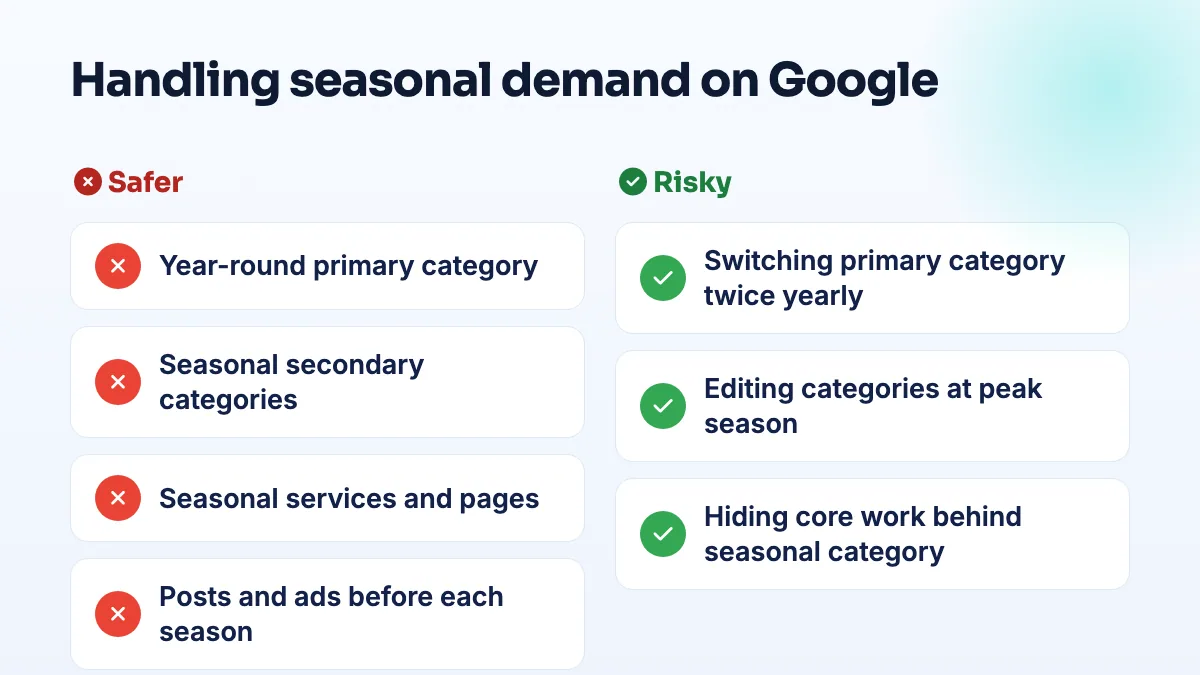
- Keep a year-round primary, add seasonal secondaries
- Seasonal pages and posts carry the seasonal signal
- Use ads, not profile edits, for peak weeks
My answer is no. I wouldn't change your Google Business category seasonally, because a primary category change can send the profile back for review, and owners have reported suspensions straight after one. You can capture seasonal demand without touching the primary category: set it to your year-round core, add the seasonal work as secondary categories and services, and time your pages and posts before each season starts.
It's one of the longest-running questions in the Google Business Profile Help Community, mostly from HVAC companies and landscapers, so here's the reasoning and what I'd do instead.
Why I wouldn't change your Google Business category seasonally
The idea is simple enough. An HVAC company in a Help Community thread about switching between AC and furnace categories asked about running air conditioning as the primary category in summer and furnace repair in winter. Another owner raised the same thing in a thread about a seasonal primary category. The logic is that the primary category carries the most weight, so point it at whatever people are searching this month.
The problem is what a category change does to the profile. In a Help Community thread about a primary category change that led to suspension, the edit came first and the suspension followed. A contractor in another thread described editing categories and watching a live profile drop into verification. A seasonal switch means doing that twice a year, every year, and every time you're betting your reviews and calls on the edit going through cleanly.
Then there's the evidence on the upside. I went through the owner threads looking for someone who had switched their primary category for the season and could show it worked. I didn't find one. The advice that it works comes from marketing blogs, not from owners' results. That isn't proof it never helps, but it's a lot of risk for a benefit nobody has shown.
What to do instead
- Set the primary category to your year-round core. The work that makes you money across the most months and that you'd want to be known for. For many heating and cooling firms that's HVAC contractor. For many landscapers it's landscaper or lawn care service. Choose it once, using the logic in my answer on choosing GBP categories.
- Add the seasonal work as secondary categories now. Air conditioning, furnace or heating work, snow removal. Add them all at the same time, during a quiet week, in one edit, and leave them on all year.
- List seasonal services in the services section. With your own wording and a short description for each: AC tune-up, furnace repair, snow plowing, salting. This is where the seasonal detail lives without risking the category.
- Give each season its own page on your website. Update it, with fresh photos and prices, a few weeks before the season, not when the first cold snap hits.
- Use posts and offers to signal the season. A post about furnace checks in early fall or snow contracts before the first snowfall tells searchers you're ready, without editing the core profile.
- Use ads for the peak weeks. If you need extra reach when demand spikes, paid campaigns can be switched on and off. The Business Profile shouldn't be.
If you do need to change categories for a good reason, such as a real change in what the business does, read the safe way to edit Google Business Profile first and batch the change into one edit.
What's different for HVAC companies
HVAC is the clearest case against switching, because most companies do both heating and cooling all year and the demand overlaps in spring and fall. A primary category that covers both is usually a better fit than flipping between AC and furnace. Put the seasonal emphasis on the website, where a strong furnace repair page can do the work in October without touching the profile. That's how I'd set up HVAC contractor SEO for a two-season business.
What's different for landscapers
Landscapers who plow are often a different business in winter, which makes the switch more tempting. I still wouldn't do it. Add snow removal as a secondary category and service, give it a proper page, and start promoting it early: LawnSite members debate whether it's too soon to start marketing snow removal every year. There's also a counterintuitive point from a LawnSite thread on off-season winter work: competition drops in winter because people stop advertising, while customers are still searching for spring services. That makes winter the time to keep your landscaping pages fresh, not to hide them behind a snow category. I cover the timing in landscaping winter marketing, and it's part of how I plan SEO for landscapers through the year.
If you want the categories, services and seasonal pages set up once and left to work, that's part of our Google Business Profile management.
People also ask
Why are my customers' Google reviews not showing up?
Usually because Google is holding the review back, not because it was never written. A filtered review stays visible to the person who wrote it, so their screenshot doesn't prove it's public. New or empty accounts, sudden bursts of reviews and anything rewarded are the usual triggers. If nobody at all can leave a review, check your profile for a suspension, a verification request or a ratings restriction.
Read the full answer: Why are my customers' Google reviews not showing up? →
Can you offer a discount or gift card for a Google review?
No. Google's review policy doesn't allow money, discounts, gift cards, free services or other incentives in exchange for reviews, even if you never ask for five stars. It often doesn't work either: one lawn care operator gave gift cards to all 21 of their clients, spent $500 and got zero reviews. A plain request at the right moment, with a direct link, does better and stays inside the rules.
Read the full answer: Can you offer a discount or gift card for a Google review? →
Is that Google Business Profile email or call a scam?
Usually yes, if you didn't ask for it. Unsolicited emails and calls warning that your listing will be removed, your site isn't compliant or your ranking is at risk are mostly sales pitches or scams. Real Google requests do exist, so don't judge by how the message looks: close it, sign in to your profile yourself, and act only on requests that appear there.
Read the full answer: Is that Google Business Profile email or call a scam? →
Will Google remove a review from someone who was never a customer?
Usually not, if they dealt with your business at all. Google doesn't require reviewers to be customers, only to have interacted with you, so reviews from refused clients, couriers and towed drivers normally stay. Google does remove reviews with no real interaction, reviews about something other than your business, and reviews from someone with a personal conflict of interest. For the rest, a calm reply is your best tool.
Read the full answer: Will Google remove a review from someone who was never a customer? →
Why does my verified Google Business Profile not show up publicly?
Because verification and publication are separate. Verification proves the business is real; Google still has to be confident enough to show the listing to everyone. A new business with no website, directory listings or registry record can pass verification and stay "Only visible to you", especially if an older business shares its name. Search your name signed out to see which gate you're at, then build that footprint.
Read the full answer: Why does my verified Google Business Profile not show up publicly? →