


Key points
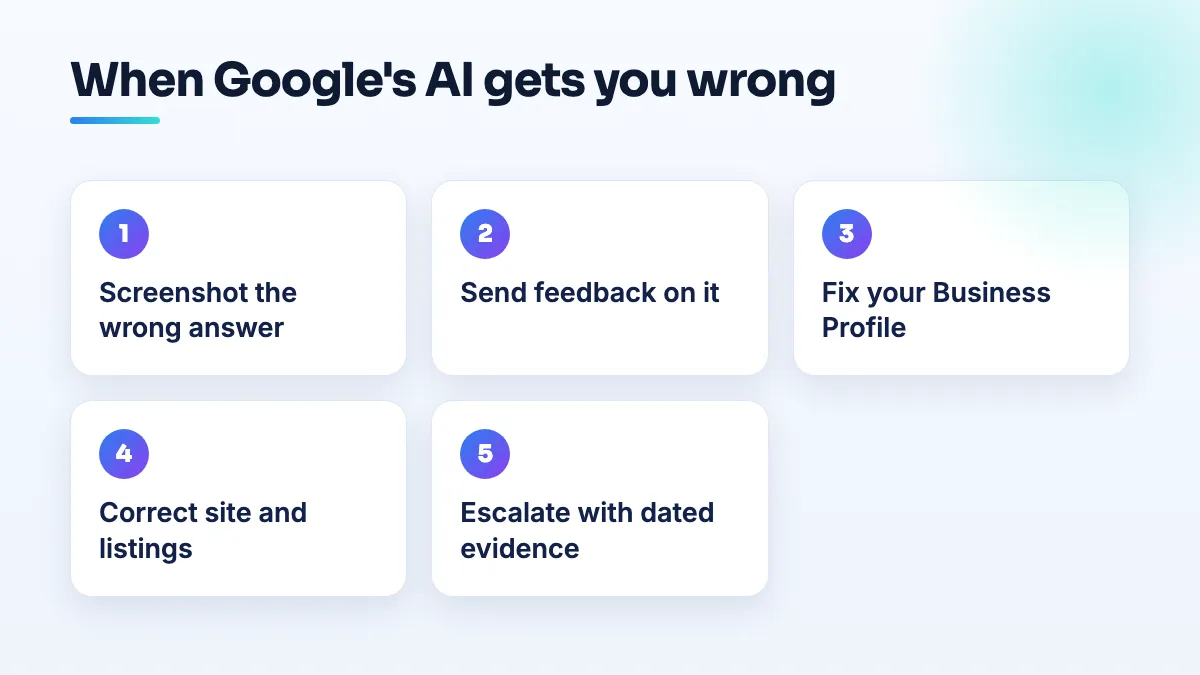
- Screenshot the wrong answer with the date and search
- Use the feedback option on the AI answer
- State the truth plainly on your profile and site
- Fix booking platforms and directories that contradict you
- Escalate with dated evidence, not repeated complaints
When Google's AI tells searchers something false about your business, such as that you're closed, not taking clients, or someone else entirely, support usually can't just delete the sentence. What you can do is record it, report it, and fix the sources the answer is built from, so the next answer comes out right. That's the whole approach when Google AI shows wrong information about your business.
I'll go through what's been reported, what feeds these answers, and the order I'd fix things in.
What owners have reported
In a Help Community thread from a barber that Gemini said wasn't accepting new clients, the owner reported that searchers had been told this for about nine months while the business was open and working. The owner described significant financial losses, and support said it couldn't remove Gemini-generated information.
A second pattern is the AI mixing two businesses together. A Help Community thread about an AI Overview merging two unrelated businesses describes exactly that: details from one business presented as belonging to another.
Support couldn't remove the barber's answer, and I wouldn't expect a faster route for a merged one. That's the key thing to understand before you start: you're not editing the AI answer, you're changing what it reads.
Why the AI gets your business wrong
AI answers about local businesses are assembled from what Google already has: your Business Profile, your website, reviews, and other sites that mention you. When the answer is wrong, one of those is usually wrong, out of date, or ambiguous. The usual culprits I find:
- An old line on your own site. A "fully booked, waitlist only" banner from two years ago, or a page for a location you closed.
- A booking platform or directory profile that says something different. A marketplace page showing no availability, or an old listing with different hours.
- Reviews that mention it. Several reviews saying "couldn't get an appointment" can read like a fact.
- A similar name nearby. Two businesses with close names, or a previous business at your address, give the AI two sets of facts to blend.
How to fix Google AI wrong information about your business
- Record exactly what the AI says. Search the way a customer would, on a phone and a computer, and screenshot the answer with the date and the search you typed. Do it again weekly so you can show how long it's been going on.
- Send feedback on the answer itself. Use the feedback option on the AI answer to mark it wrong and say, in one line, what's true: "This business is open and accepting new clients." It doesn't guarantee a change, but it puts the error on record.
- Make your Business Profile state the truth plainly. Check the hours, special hours, booking link, description and services. Post an update that says what's wrong in the AI answer, stated positively: "Now booking new clients. Book online or call." Profile content is one of the most direct sources Google has, so it goes first.
- Correct your website. Remove old banners, closed-location pages and outdated notices. Put the true statement on the home page and booking page in plain text, such as "Accepting new clients" next to your booking button.
- Fix every other place that contradicts you. Booking platforms, Facebook, Instagram bio, Yelp, Apple Maps and directory listings. Close or update old profiles, and make the name, address, phone and hours identical everywhere. This is ordinary citation cleanup, and it's what the AI reads.
- If two businesses are being merged, separate them. Check for a duplicate or old listing at your address and report it. Make your business name, phone and website distinct from the other business everywhere you control.
- Escalate with evidence. Post in the Business Profile Help Community with your dated screenshots, what you've corrected, and the dates. Product Experts can't edit AI answers, but they can escalate a clear, well-documented case.
How long it takes, and what not to do
Expect weeks, not days, and keep screenshotting so you know when it changes. That barber's case ran for months, which is why I'd start on the sources the day you notice rather than waiting on a support reply.
- Don't create a new profile to get a clean slate. Duplicates give the AI more conflicting facts, not fewer.
- Don't flood reviews with "they're open" posts from friends. Review bursts get filtered and can hurt the reviews you earned.
- Don't argue with it in review replies. Fix the facts at the source instead.
What's different for barbers and appointment businesses
Barbers and stylists are especially exposed, because availability changes weekly and it lives across several places: your booking app, your Instagram, your profile and your site. A "no availability this week" on one platform can read as "not accepting clients" to a machine. Keep one plain, permanent statement about new clients on your own site and profile, separate from your live calendar. It's a small thing I set up in every SEO for barbers project now.
The same sources shape whether AI tools recommend you at all, which I cover in the answer on AI search recommendations, and it's worth knowing that local AI Overviews have also been seen quoting self-promotional best of lists. If you'd like the profile side checked, it's part of our Google Business Profile management.
People also ask
Can a booth renter get their own Google Business Profile?
Usually not at the salon's address. Google only lets a business in a shared space list that address if it has its own dedicated space with permanent signage, where customers deal with its own staff during business hours. An open-floor chair doesn't pass that test. A private suite with your name on the door can, and a renter who also travels to clients can list as a service-area business with the home address hidden.
Read the full answer: Can a booth renter get their own Google Business Profile? →
Will Google remove a review from someone who was never a customer?
Usually not, if they dealt with your business at all. Google doesn't require reviewers to be customers, only to have interacted with you, so reviews from refused clients, couriers and towed drivers normally stay. Google does remove reviews with no real interaction, reviews about something other than your business, and reviews from someone with a personal conflict of interest. For the rest, a calm reply is your best tool.
Read the full answer: Will Google remove a review from someone who was never a customer? →
Is Booksy worth it for barbers?
It can be, as booking software and as a short-term way to fill an empty chair. As your main source of new clients, it's weaker than it looks: barbers report that Booksy's marketplace sends its own clientele, shared with every other barber nearby, and some accuse it of taking referrals and fees. Use it for scheduling, and build your Google profile and website as the client channel you own.
Do you need a website if your clients book through Instagram or Booksy?
Yes, if you want to keep the clients you've built. Instagram, Facebook and Booksy are rented space: an account can be banned, reach can collapse and the marketplace shows your clients other shops. A simple website you own gives Google and new clients a stable place to find you, and it holds your booking link, services and prices whatever happens to the platforms.
Read the full answer: Do you need a website if your clients book through Instagram or Booksy? →
Can an agency's restricted Google account get my profile suspended?
Yes. If an agency, freelancer or vendor with access to your listing has its Google account restricted, Google can suspend every profile connected to that account, and yours goes with it. The notice says a Google account associated with the profile was restricted. Proving your address won't fix it: remove the account, have the agency resolve its restriction, and appeal on that point.
Read the full answer: Can an agency's restricted Google account get my profile suspended? →