

Your verification video came back rejected because Google wanted to see street signage, and your unit sits on an industrial estate, down a back lane or on a road the council never signed. Google video verification with no signage can still pass: the reviewer needs one unbroken clip proving the address is real, the business is yours and you control the space, and a permanent sign on your own door does more for that than any sign on the street.
This catches fabrication shops, machine shops, dog daycares and boarding kennels, private tattoo studios, specimen collection sites, solar warehouses and electricians who run from a yard. I went through the Google Business Profile Help Community threads where these videos fail, and the rejection wording rarely means what the owner thinks it means.
Below is what the reviewer is actually matching, the order I'd film it in, what changes by type of premises, and what to do if the video is rejected anyway.
Why a premises with no signage fails Google video verification
The feedback reads the same across very different businesses. The owner of an industrial unit in a Help Community thread about an industrial unit's rejected video was asked for street signage and branded equipment the unit simply didn't have. A dog daycare in a thread from a dog daycare whose videos kept getting rejected hit the same wall again and again. And an electrician in a Help Community thread about a road with no street sign couldn't get through because the council had never put a sign up on his road.
Underneath all three is one question: can the reviewer match the place in the video to the address on the profile, and the business to you? A street sign is just the easiest way to answer the first half. When there isn't one, you have to answer it some other way, and most rejected videos don't.
Manufacturers have a second problem. A Help Community thread about premises customers never visit shows verification failing precisely because nobody outside the business ever comes to the site. Another owner found the category they'd picked required a location customers can visit, which their unit wasn't. That's not a filming problem. It's a setup problem, and I deal with it in the next section.
Sometimes the video isn't the problem at all. A solar installer in North Sydney went back into verification after routine edits, and their Help Community thread about a rejected reverification video lists everything it showed: the location, permanent signage, controlled access, the office, equipment and proof of management. It was rejected with no deficiency named. When a video that complete fails, I look at what changed on the profile just before it, not at the footage.
Decide first whether customers come to the premises
Answer this honestly before you film, because it decides what the video has to prove.
- Customers come to you. Owners drop dogs at the daycare, clients sit in the tattoo chair, donors walk into the collection room, a buyer collects parts from the shop. You're a storefront, the address shows publicly, and the video has to prove a customer could find the door and be served there during your hours.
- You go to customers. The solar crew installs on roofs, the electrician wires houses, the fabricator fits railings on site. The unit is your base, the address should be hidden, and you're verifying as a service-area business. The Product Expert's list in a Product Expert's reply to a driving school stuck in verification applies: the area around the address, your equipment or vehicle, and proof of management.
- Neither. If customers never visit and you never visit them because everything ships, the video isn't the issue. Google's eligibility rules require in-person contact one way or the other, and no amount of filming changes that.
Getting this wrong produces a lot of the rejections above. A fab shop set up as a storefront, with opening hours and a visible address, is telling Google that customers walk in. The reviewer then looks for what walk-in customers would see: a sign, an entrance, somewhere to be served. If customers really don't come, change the profile first. The shot list for that case is in my guide to GBP video verification for a service-area business. The steps below are for premises you're going to film.
How to film the video when there's no sign on the street
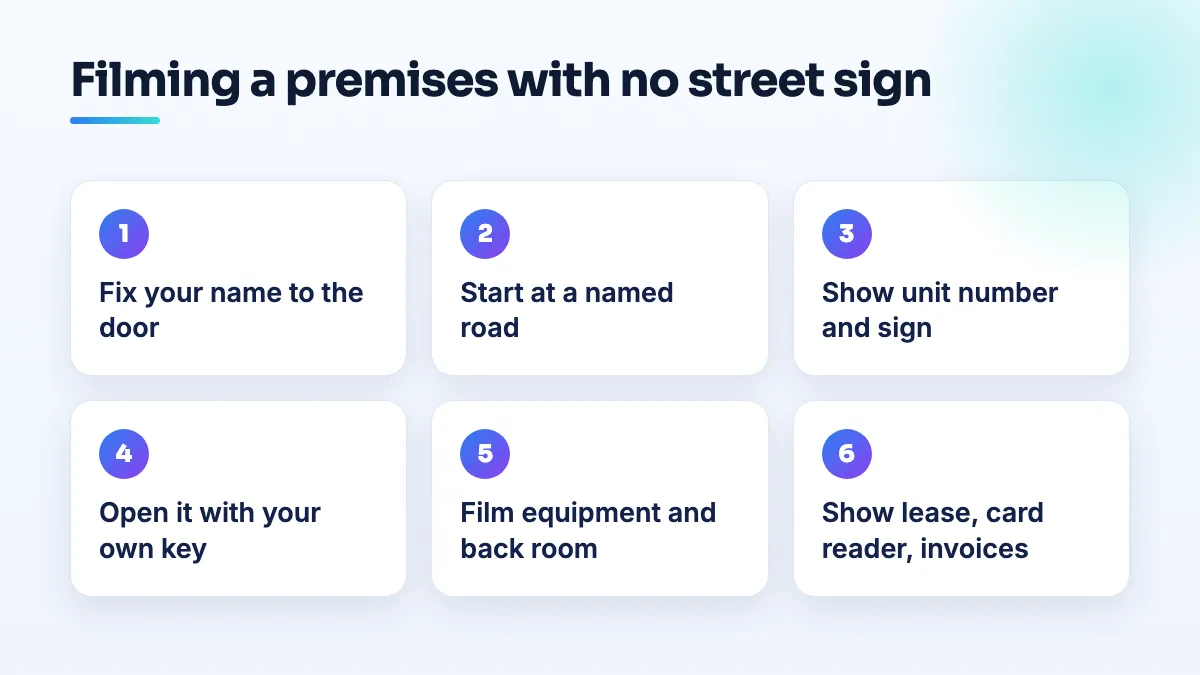
Film on your phone in daylight, as one continuous clip. Walk the route once without recording so you don't stop to think halfway. Every step below replaces something a street sign would have told the reviewer.
- Put your business name permanently on your own door first. Vinyl lettering on the glass, an engraved plate beside the door, a painted panel on the roller shutter. It doesn't need to face the street. It needs to be fixed to the space you control and match the profile name exactly. A Platinum Product Expert has put the shared-space rule as needing "a dedicated office with permanent signage", and a suite in that case was rejected because the name wasn't on its door. If your landlord won't allow any sign, read about verification when the landlord bans signage before you film.
- Start recording at the nearest point Google can place on a map. If your road has no sign, begin at the nearest intersection that does, at the estate's entrance board, or at a neighboring business with its name up. Then walk or drive to your unit without stopping. The unbroken route is what replaces the missing sign.
- Show the unit number and your sign in the same frame. Hold on the building or unit number for a couple of seconds, then pan to your door with the name on it. If the estate lists its tenants on a directory board at the gate, film that board on the way in.
- Open the door with your own key. A key, a keypad code, a fob on the shutter. This is proof of management, and it's the one shot I'd never leave out, because it's the thing a stranger with a phone can't fake.
- Walk through the working space. Film the equipment that matches your primary category: the press brake and welding bays, the CNC machines, the kennels and play yard, the tattoo stations and autoclave, the collection room, the racks of panels and inverters. Then show the back of house: the office, the storeroom, the staff area.
- Show that the business runs from this address. Film your card reader, a page of the lease or permit with the address visible, and an invoice or delivery note addressed to the unit. Keep customers' names and details off the screen.
- Upload the clip unedited, then leave the profile alone. No cuts, no music. Don't touch the name, hours, category or address while it's under review.
Step six comes from an unexpected place. In a Help Community thread about a pharmacy's deceptive content suspension, the evidence set that applies to any site customers visit is laid out: signage, a business card, the lease or license, the reception area, back of house, payment methods and equipment. That list works for a collection site, a kennel or a tattoo studio just as well as a pharmacy.
What to film for your kind of premises
The three things the reviewer is matching never change. What fills them does.
| Premises | What stands in for the street sign | What proves the business runs there |
|---|---|---|
| Fabrication or manufacturing unit | Estate entrance board, unit number, name on the roller door | Machines and welding bays, stock with delivery notes addressed to the unit |
| CNC machine shop | Tenant board at the gate, name plate by the office door | Machines, inspection area, a purchase order or job traveler with your name |
| Dog daycare or boarding kennel | Parking area and drop-off entrance with your name on it | Check-in desk, kennels, play yard, staff at work |
| Private tattoo studio | Building number, then a buzzer or door plate with the studio name | Stations, autoclave, your license on the wall, the booking screen |
| Specimen collection or testing site | Name on the suite door, directions inside the building | Reception, collection room, equipment, payment terminal |
| Solar installer warehouse | Name on the warehouse door, branded vehicles in the yard | Panels and inverters on the racks, the office, job paperwork |
| Electrician on an unsigned road | The nearest signed intersection, then an unbroken route | Van, stock, your key to the yard or lockup |
A few differences matter more than the table shows.
- Machine and fab shops: if buyers visit for first-article inspections or collect parts from a counter, that's genuine in-person contact, so set hours that match it and film the place they'd stand. If every job ships, you're in the "neither" group and the fix is the setup, not the video.
- Dog daycares and kennels: customers come to you, so the address shows. Film the route a dog owner takes from the parking lot to the check-in desk, because that's the journey the reviewer is checking.
- Tattoo studios: plenty of private studios keep the door locked during open hours and work by appointment. That's fine, as long as the video shows a customer could still reach you: the buzzer with your name, then you opening the door.
- Collection sites: don't reformat your business name while you're verifying. In the pharmacy thread above, a name-format edit on its own triggered a deceptive content suspension.
- Solar and electrical contractors: most of you go to customers, so you're verifying as a service-area business from a yard or warehouse. Hide the address, and treat the warehouse like the area around a home: show where it sits, then your vehicles and stock.
If the video is rejected anyway
- Read the rejection against the three questions. Location wording means the route from a mappable point was too short. Signage or equipment wording means the door and the working space weren't shown long or close enough. Management wording means the key shot or the paperwork was missing.
- Check what changed on the profile. List every edit made in the weeks before the request. If the verification was triggered by an edit, like the solar installer's, undo nothing in a hurry and change nothing else until it's resolved.
- Reshoot once, with the missing piece longer and closer. Never resend the same clip. Every attempt counts, and running out of them leaves you with no way to verify at all.
- Post in the Help Community with the facts. Say whether customers visit, what the video showed shot by shot, the exact rejection wording and any case ID. Product Experts can't verify you by hand, as the one in the driving school thread said, but they can tell you what went wrong and escalate a case that's clearly stuck.
- If it turns into a suspension, expect to wait. The pharmacy thread noted that appeals take anywhere from 2 to 30 business days. Use that time to fix the setup, not to submit more evidence.
What not to do
- Don't tape a paper sign up for the video and take it down afterwards. The reviewer is looking for permanence, and so is anyone who checks Street View later.
- Don't film the landlord's sign or a neighbor's reception as if it's yours. The door you open has to be the unit on your profile.
- Don't switch to a category that doesn't need a visit just to dodge the check. That's a known spam tactic: fake moving listings pick "logistics company" to avoid the stricter mover video. It makes your listing look like theirs.
- Don't move the profile to a virtual office to get a signed address. Virtual offices aren't eligible, and a coworking desk only qualifies if it's staffed by your own people during business hours.
- Don't keep editing while you wait. Every change can send the profile back into review.
Get the premises right once
Most of the verification cases I take on are fixed by the setup and one well-planned video, not by five hurried ones. It's the first job in our Google Business Profile management, and it matters just as much in manufacturing SEO, pet business SEO and SEO for tattoo shops, where the premises rarely looks like a shop. If you'd rather have the profile checked before you spend another attempt, it's part of our local SEO services.
Written by Saifur Rifat, Founder & SEO Lead at SERP Squad.